Videoconferences with BlueMind.Video
BlueMind Video is a SAAS videoconferencing service based on Jitsi and integrated with BlueMind.
Installation
This feature is integrated into BlueMind, and does not require the installation of additional packages.
However, access to this service requires a subscription. For more information on this service, visit BlueMind Subscription or contact BlueMind sales team for rates.
To check whether a subscription entitles you to the service, go to the administration console > System management > Manage subscription :
- The value for the row "Maximum number of full video conferencing accounts" must be more than 0
- The value for the row "End of BlueMind.Video subscription validity" must show a current date (not expired)
For more information on subscription management, visit Managing subscription.
Configuration
Activation and content template
Activating videoconferencing for domain users is as simple as setting up an invitation template for the associated resource.
To do this, go to the administration console > System Management > Supervised Domains > choose the desired domain > Videoconferencing tab:
Enter the invitation template, for example :
${Organisateur} invites you to a conference, join us at:
${URL}

This template can be declined in several languages using the drop-down list.
→ Once the pattern has been saved, a resource named "BlueMind.Video" is automatically created and displayed in the directory. This will enable users to create videoconferences automatically.
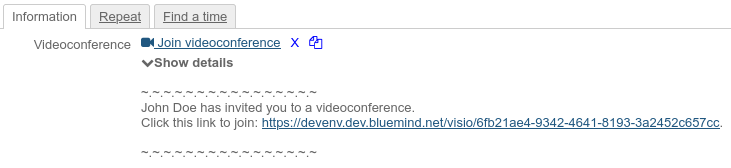
When a user adds a videoconference to their event, the pattern will be automatically added to the event and the invitation email sent to the participants:
For more information, see :
- the following paragraph Access the videoconference
- the dedicated user guide page: Creating videoconferences
User profile configuration
Video conferencing usage limitations depend on the type of user account:
- A videoconference initiated by a "Collaborative" user (the usual type of account) is limited to 45 minutes and two participants.
- A videoconference involving a "Collaborative + Visio" user is not time-limited and allows up to 100 participants: as soon as such a user creates or connects to the videoconference, the parameters are applied.
Domain settings
As the subscription allows a certain number of users with the "Collaborative + Visio" profile, you need to set the maximum number of users authorized with this profile for each domain. To do this, go to the administration console > System Management > Supervised Domains > choose the desired domain > General tab and enter the desired ceiling in the field "Maximum number of advanced video accounts:".
If the field is empty, then no "Collaborative + Visio" profile user is authorized for the domain. It is therefore necessary to enter a value in this field to be able to assign the profile to users.
Profile assignment
The "Collaborative + Visio" profile can be assigned to domain users if the domain settings allow this (see above), either when they are created or by accessing their management file in the administration console > General tab > section "Account information":
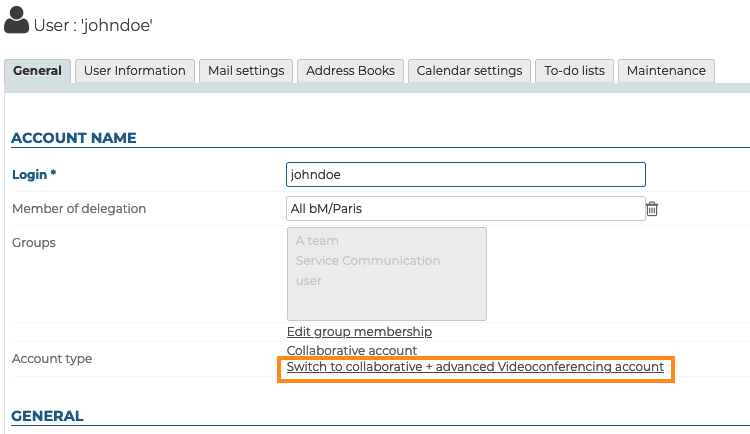
The role "Manage BlueMind subscription" is required to be able to make such a change.
Accessing the videoconference
Once the invitation template has been filled in (see above), the videoconference is available to domain users.
Access rights (optional)
Access to the new feature is done through the BlueMind.video resource created during the domain configuration (see above). By default, this resource is shared with a simple reservation right: all domain users can create a videoconference. To restrict access to the videoconference, you need to modify the sharing rights of the resource to give access to certain users or groups only.
Using the resource
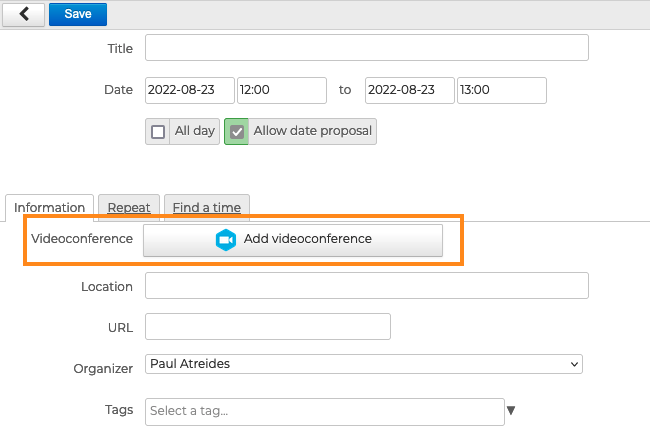
The resource must not (and cannot) be invited to an event from BlueMind: once configured, a button is available in the BlueMind navigation banner, as well as in the event creation interface of rights holders:
For further information, see:
- Videoconferencing
- Organizing Meetings > Adding videoconferences
- Working with Outlook > Videoconferencing
Technical configuration
The following accesses must be open:
-
Between the BlueMind server hosting the installation and the BlueMind Video server :
Requirement Address Port Protocol Description Required video.bluemind.net443 TCP API + WEBSOCKET Required video-turn.bluemind.net443 TCP TURN -
Between each client workstation and the BlueMind Video server :
Requirement Address Port Protocol Description Required video.bluemind.net 443 TCP API + WEBSOCKET Optional
Highly recommendedvideo.bluemind.net10000 UDP VIDEO BRIDGE Optional
Highly recommendedvideo.bluemind.net11000 UDP VIDEO BRIDGE Optional video.bluemind.net3478, 5349 TCP STUN
Although ports 10000 and 11000 are optional, they are highly recommended to ensure good audio/video quality. Passing through a STUN port 443 tunnel is functional, but quality will be poor.
To guarantee a quality connection, we recommend that you do not use a VPN to access BlueMind Video.