Creating Videoconferences
BlueMind offers several solutions for linking videoconferences to events:
- via the integrated solution BlueMind Video (based on Jitsi Meet)
- via a connection to one of the external solutions supported :
This feature must first be installed by administrators who make it available to users.
Integrate a videoconference into a calendar event
Regardless of the solution installed by the administrator, it is possible to integrate a videoconference into meetings created in the calendar. In this case, participants will receive the videoconference invitation in the meeting invitation.
For further information, see:
Creating independent Videoconferences
With BlueMind Video, you can also create videoconferences outside the Calendar. To do this, click  in the navigation ribbon.
Once the videoconferencing page is open, copy the link displayed in the browser and send it to participants:
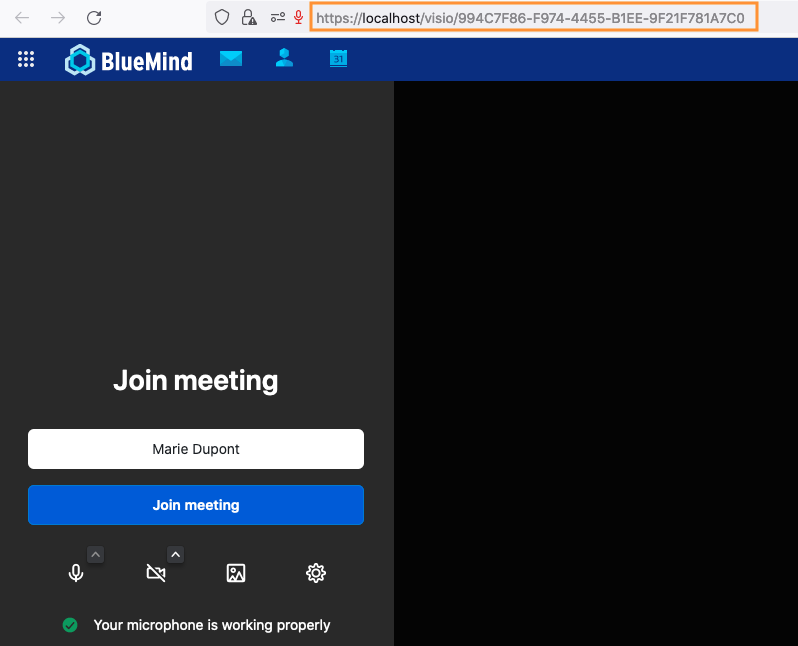
You can also create a videoconference link manually (to send by email, for example), without opening the application.
Write: https://domainname/visio/conferencetitle - for example: https://bm.devenv.blue/visio/welcome
⚠️ Please note: as a security measure, to limit the risk of prediction by a third party, the personalized title must include a minimum of 7 letters.