Hardware Sizing
The data provided here is for information purposes only. Usage may vary for a same number of users, depending on hardware structure and use habits. The number of emails, their size, the number of recipients in each email, the number of appointments, scheduling... this all is very different from one installation to another.
The vCPU and/or RAM resources indicated below are understood to be dedicated to virtual machines. In other words, these resources must be excluded from any sharing with other virtual machines. In fact, particular care must be taken not to place BlueMind instances in a context where the hypervisor(s) is (are) in overcommit status.
About units
A BlueMind system is made up of multiple components that use up resources.
A basic "per-user" calculation is not valid because a user who only uses the mail app will not place the same load on the system as a user who uses both mail app AND collaboration tools (calendar, etc.), nor as a user who uses MAPI.
Two factors come into play in this calculation:
- Usage: The more features a user enables (collaboration, MAPI), the more they tax the system;
- Storage associated with this use case: For the same use case, a higher quota means more data to index, back up, and serve, and therefore acts as a multiplier on the cost per unit.
The sizing calculation is therefore performed on a per-unit basis, given that:
| User profile | Storage / quota | Cost per Unit |
|---|---|---|
| Mail only | 2 GB | 1 |
| Mail + intensive collaboration | 4 GB | 2 |
| Mail + collaborative + mapi | 10 GB | 5 |
| Mail + collaborative + mapi | 50 GB | 25 |
The last two rows illustrate the impact of storage: for the same usage (mail app + collaboration + MAPI), a fivefold increase in the quota results in a fivefold increase in the cost in units.
Similarly, for the same number of units, a mail-only application will not consume the same amount of resources as a mail + collaborative application (for half the number of users). Mail, for example, is more IO-dependent than CPU-dependent, which is generally the opposite of the case for collaborative tools.
CPU
CPU is stated in number of cores. The benchmark used for the calculations below is 1 Zen 4 core from an AMD EPYC 9654 (Genoa, 5 nm, released in late 2022): this is a recent CPU that is widely deployed and will continue to be supported by its manufacturer for several years.
The selected CPU must be supported by the manufacturer for the entire duration of the mail app contract: for a 5-year contract, choose a CPU whose manufacturer support covers the entire period. Another useful metric is the performance-per-watt ratio, which clearly favors recent architectures (≤ 5 nm) over earlier 14/10 nm generations.
Equivalences Between CPU Generations
The table "Units → , number of cores" below is expressed in Zen 4 9654-equivalent vCPUs. As a rough guide, here’s how many vCPUs from other platforms are needed to match 8 reference vCPUs, based on the Geekbench 6 single-core score (a reasonable proxy for performance per core):
| Platform | Geekbench 6 Single-Core | Ratio vs. 9654 | Equivalent to 8 reference vCPUs | Related power budget |
|---|---|---|---|---|
| Intel Xeon Platinum 8280 — Cascade Lake, 14 nm (2019) | ~1214 | 0.65 | ~12 vCPU | ~88 W |
| AMD EPYC 9654 — Zen 4, 5 nm (2022) — part number | ~1859 | 1.00 | 8 vCPU | ~30 W |
| Intel Xeon Gold 6542Y — Emerald Rapids, Intel 7 / 10 nm (2023) | ~2263 | 1.22 | ~7 vCPU | ~73 W |
| AMD EPYC 9755 — Zen 5 "Turin", 3–4 nm (2024) | ~2413 | 1.30 | ~6 vCPU | ~23 W |
Scores recorded on Geekbench Browser. Power budget = (socket TDP / number of cores) × equivalent vCPUs, at full load (8280: 205 W / 28 cores; 9654: 360 W / 96 cores; 6542Y: 250 W / 24 cores; 9755: 500 W / 128 cores). These ratios are for reference only: actual performance also depends on memory bandwidth, cache, the platform, and the workload. — A benchmark run on the target workload is still recommended for precise sizing.
In a virtualization cluster, hypervisors typically expose the capabilities of the cluster's least-utilized CPU to the virtual machines, in order to allow VMs to be moved between nodes. BlueMind leverages the modern features of CPUs based on the capabilities actually exposed to virtual machines: a recent CPU exposed with an outdated profile will not deliver its true performance.
Instruction sets supported by BlueMind
Beyond the number of cores and their clock speeds, BlueMind leverages several hardware instruction sets for operations that are very common on a mail app. Their presence can be seen in the flags of /proc/cpuinfo (or, on a VM, in those actually exposed by the hypervisor — see the box above):
aes: hardware acceleration for AES encryption, widely used on all SSL/TLS connections (IMAPS, HTTPS, SMTP STARTTLS, inter-server replication).sha_ni: Intel/AMD SHA instructions that accelerate hash calculations (integrity checks, digital signatures, storage-side hashing, and authentication).avx,avx2(SIMD): used primarily for base64 decoding when reading email attachments, a process that occurs every time a user checks their emails.
A recent CPU running in a VM with an outdated profile (for example, a Nehalem or Westmere profile on a heterogeneous cluster) may mask some or all of these flags and significantly degrade perceived performance, even though the physical hardware is identical.
Number of cores per unit
BlueMind includes many services, so we recommend 2 cores minimum.
Note that allocating too many CPUs can lead to other problems on virtualized environments.
| Units | Number of cores |
|---|---|
| 1-200 | 2 |
| 200-1,000 | 4 |
| 1,000-2,000 | 6 |
| 2,000-3,000 | 8 |
| 3,000-6,000 | 12 |
| 6,000+ | 2 / 1,000 units |
RAM
We recommend 24 GB RAM minimum.
| Units | Ram |
|---|---|
| 1-1000 | 24 GB |
| 1,000-2,500 | 32 GB |
| 2,500-5,000 | 48 GB |
| 5,000-10,000 | 64 GB* |
| 10,000+ | 96 GB* |
* with relocation of the bm-elasticsearch service to a dedicated server
bm-elasticsearch?Running Elasticsearch on its own VM addresses several concerns:
- VM size compatible with the hypervisor and its options.
Some hypervisor features impose a limit on the number of vCPUs per VM — for example, VMware Fault Tolerance is limited to 8 vCPUs per protected VM (Broadcom documentation). Offloading ES helps keep the main VM and the ES VM below these thresholds. - Staying within a NUMA node.
Once a VM exceeds a certain size, it no longer fits within a single NUMA node, and CPU/memory scheduling becomes less efficient. The granularity depends on the physical CPU: for example, a 96-core processor can be organized into groups of up to 24 cores per NUMA node, which limits the effective size of a single-socket VM. - Segregate resources between Elasticsearch and the rest of BlueMind.
With a dedicated VM, Elasticsearch’s heap, file cache, and indexing I/O no longer interfere with those of the BlueMind core or PostgreSQL. Intensive indexing no longer slows down SQL queries or access to/var/spool/cyrus/data. - Migrate to another hypervisor.
Moving the ES VM to a different host (and ideally to different network cards) frees up resources on the primary host and helps distribute the load across the virtualization pool.
The downside: One or more additional VMs for ES introduce complexity and some overhead — — a new kernel to maintain, a new BlueMind node to configure, new monitoring agents, and, when the ES VM runs on a different hypervisor, traffic must traverse the physical network for every indexing or search request. If these constraints do not apply, a single, appropriately sized VM may be sufficient.
Storage / IO Performance
Disc type
A mail app places heavy demands on disk resources, not only for reading and writing small files, but also for all email-related operations (indexing, read status, etc.). The quality and speed of disks is a key factor in high-performance mail.
The use of SSD/NVMe drives is required for a new installation and strongly recommended when upgrading from version 4, unless the existing hardware is fully satisfactory. Mechanical/rotational drives have high latency that is incompatible with the software. They may be used for backups or in a tiered storage system, behind high-performance SSDs or NVMe drives.
Storage Virtualization
Virtualized or distributed storage systems — such as Ceph, vSAN, iSCSI or NVMe-oF SANs, and NFS over remote storage — introduce several layers (network, replication, abstraction) between the BlueMind VM and the physical disks. Each of these layers results in additional latency, which adds up over the many small I/O operations typical of mail apps.
Points to note:
- Latency: Requirements vary depending on the volume. For
/var/lib/postgresql(transactional database, WAL sync), aim for < 1 ms on synchronous writes ; —if this exceeds a few milliseconds, the performance of the entire mail app suffers. For/var/spool/cyrus/dataand other I/O volumes, keep the I/O operations under 10 ms. Synchronous replication in a distributed cluster automatically adds network round trips to every write operation, which accumulate across each of these requests. - Block size: On BlueMind installations, we generally find that 80% of emails are smaller than 128 KB and 95% are smaller than 1 MB. Oversized block sizes — 4 MB blocks on the Ceph side,
DiskMaxIOSizeset to 1 MB on the VMware side, etc. — unnecessarily amplify each I/O operation and degrade performance, especially for the PostgreSQL database, which operates on 8-KB pages. - Rated vs. actual performance: The IOPS advertised by the array do not reflect those actually available to the VM once the cache is saturated or when other workloads are running on the cluster.
- Cluster events: Rebuild and rebalance operations on the Ceph or vSAN side may temporarily degrade performance as seen by the VM.
- Segregation of network traffic: The network used to access storage must be separated from user traffic. Downloading a large attachment by an Outlook client should not affect the performance of SQL queries or email volume writes. It is standard practice to dedicate separate interfaces and/or VLANs to storage.
Local latency alternative: A hypervisor such as Proxmox, combined with ZFS on local NVMe drives, offers the latency of a directly attached drive while maintaining snapshots, asynchronous replication, and data integrity. This is a suitable approach when I/O performance takes precedence over the hot mobility of VMs.
Restoring the BlueMind instance to a previous hypervisor or ZFS snapshot has implications for clients that have already been configured:
- MAPI clients (Outlook): The client and server statuses become out of sync, which may result in duplicate items, missing items, or a complete resynchronization of the mailbox.
- Mobile apps / MailApp: Object usernames (UIDs, sync keys) are retained over time, allowing clients to revert or skip changes.
To ensure consistency when rolling back client-side data, use DataProtect for restoration rather than a snapshot.
Snapshots, however, remain a suitable safety net during an upgrade, provided two conditions are met:
- user traffic is blocked upstream of BlueMind before the snapshot is taken (no active MAPI, mobile, or webmail clients during the window);
- Snapshots are atomic across all VMs in the infrastructure to ensure consistent return across services.
Minimum disk performance
Storage performance is measured in terms of two key metrics: IOPS1 and latency. A mail app is a heavy consumer of I/O.
For example, a drive like the Samsung PM1733 NVMe SSD (2022) perfectly meets these requirements when connected directly. As soon as that same disk is hidden behind a network storage layer (Ceph, vSAN, iSCSI SAN, or NVMe-oF...), the latency introduced by the layer and the configuration of these components for the mail app make all the difference (see the Storage Virtualization section).
BlueMind v5 explicitly accounts for this asymmetry using a dedicated I/O buffer mounted at /var/mmap-pool (see the corresponding row in the mount points table below). It keeps as much data in memory as possible, and when writing to disk becomes necessary, it groups operations into large blocks that are more easily handled by the underlying layers — which makes the software significantly more resilient than an IO-naive service when dealing with virtualized or network storage (vSAN, Ceph, NFS, iSCSI SAN, or NVMe-oF). It is also this mechanism that reconciles the need for high-performance mail app writes with high-availability requirements, which almost always necessitate virtualized storage.
Storage space, on the other hand, depends directly on customer demand (quotas, etc.).
Depending on the end use, not all disks need to have the same level of performance, nor the same volume.
The minimum volumes given below are estimates and may vary according to the installation and the evolution of the organization. It is therefore preferable to use technologies that allow simple expansion of FS (LVM, etc.).
Mounting point | Description | NFS type | Object Storage S3/Scality Ring type | Minimum volume |
|---|---|---|---|---|
/var/spool/cyrus/data | Email storage space | ❌ | ✅ | Largest storage space, to be determined according to expected mail volume. |
/var/spool/bm-hsm | Inherited from v4. Secondary storage for emails; the code remains in place to ensure compatibility during migrations from v4 → to v5. For a new v5 installation, do not enable the built-in HSM: BlueMind prefers that the storage hierarchy be managed at the application level, either using object storage (where the hierarchy can be configured at the bucket level) or by entrusting the management of a RAM/NVMe/mechanical disk pool to storage teams with expertise in this area. | ⚠️ | ❌ | |
/var/lib/postgresql | PostgreSQL database | ❌ | ❌ | 5% of the volume of |
/var/spool/bm-elasticsearch | ElasticSearch index data | ❌ | ❌ | 10% of the volume of |
/var/spool/bm-mail | Sending emails via EAS/mapi | ❌ | ❌ | 2 GB |
/var/backups/bluemind | DataProtect backups | ✅ | ❌ | Sum of: |
/var/spool/bm-mapi | Temporary folders for the bm-mapi service | ❌ | ❌ | 2 GB |
/var/lib/keydb | KeyDB/Redis database (internal cache, replaces | ❌ | ❌ | At least 2 GB, to be adjusted based on the number of concurrent sessions and the size of the directory (including photos and S/MIME certificates). |
/var/lib/influxdb | InfluxDB database (monitoring metrics) | ❌ | ❌ | 5 GB, proportional to the number of users (certain mapi and imap metrics are collected per user). |
/var/mmap-pool | BlueMind's IO Buffer, designed to bridge the gap between software requirements (small, frequent, low-latency I/O) and the limitations of virtualized or network storage. Keeps as much data in memory as possible; when writing to disk becomes necessary, it groups operations into large blocks that are more easily handled by the underlying layers (vSAN, Ceph, NFS, iSCSI SAN, or NVMe-oF). The disk space is reserved, but actual writes are triggered only when system memory becomes constrained. | ❌ | ❌ | 20 GB |
/var/spool/bm-docs | Storage of user thumbnails, resources... | ❌ | ❌ | 1 MB per entity with label |
/var/spool/postfix | Email queue | ❌ | ❌ | 2 GB |
/var/log | System and application logs | ❌ | ❌ | 50 GB |
/tmp | Temporary files | ❌ | ❌ | 1.2GB of space is required to install BlueMind. This is related to decompressing the installer |
/usr | ❌ | ❌ | 8 GB of storage is required to hold the modules and web applications. |
/var/spool/cyrus/data?BlueMind v4 used cyrus-imapd as its IMAP storage engine. Starting with version 5, Cyrus is being phased out in favor of an internal BlueMind solution; the IMAP protocol continues to be supported as an access method alongside ActiveSync, MAPI, and CalDAV, but it is no longer the component that stores emails.
To facilitate migration from v4 and align with our customers' existing on-premise storage allocations, emails will continue to be stored (excluding attachment storage) under /var/spool/cyrus/data. The path remains unchanged; the Cyrus software, however, is no longer in use.
Prioritize object storage to achieve better results than NFS setups, especially if the block storage being used is network-based (e.g., Ceph, iSCSI SAN, or NVMe-oF).
Object storage
BlueMind v5 emails can be stored on an S3-compatible object storage system (or native Scality Ring). This is the preferred option when you want to offload the PostgreSQL server — that hosts the bj-data database and most of the tables related to mail apps — by moving email blobs off the local disk and delegating storage tiering (RAM / NVMe / mechanical disks) to the object layer rather than the built-in HSM.
The most commonly deployed object-oriented systems with BlueMind:
| System | Ways to access | Typical scenario |
|---|---|---|
| Ceph | S3 (RadosGW) | On-premises, internal clusters |
| Scality Ring | Native Ring (sproxyd) or S3 | On-premises, high volumes |
| Scality Artesca | S3 | More on pre-production |
| Outscale Object Storage | S3 | Sovereign cloud |
| MinIO | S3 | On-premises |
| SeaweedFS | S3 | On-premises |
Each of these systems comes with its own constraints (consistency, minimum block size, latency, storage class management, TLS integration, key management, scalability, behavior during load balancing, etc.) and the same backend isn't configured the same way depending on what it's asked to store: a cluster set up to stream videos several gigabytes in size isn't necessarily the best fit for an email bucket, where the vast majority of objects are less than 1 MB. The choice of backend and its configuration must be finalized before the architecture is set in stone, particularly with regard to the points discussed in the Storage Virtualization section (latency for small objects, block size, cluster events).
Bandwidth
The required bandwidth is not easy to predict: it depends largely on email traffic, which itself varies greatly depending on usage patterns and events (newsletters, mass communications, etc.). The information below is intended to provide a sense of scale and a framework for analysis rather than prescriptive values.
Example from a real-world installation
The graph below shows the external network traffic observed on a BlueMind SaaS installation over the course of a week. Since all users are external to the infrastructure, their traffic passes through the Internet; internal network traffic (access to object storage, etc.) is not counted. Spam traffic is also blocked at the source by dedicated equipment and therefore does not appear in the incoming traffic measured here.
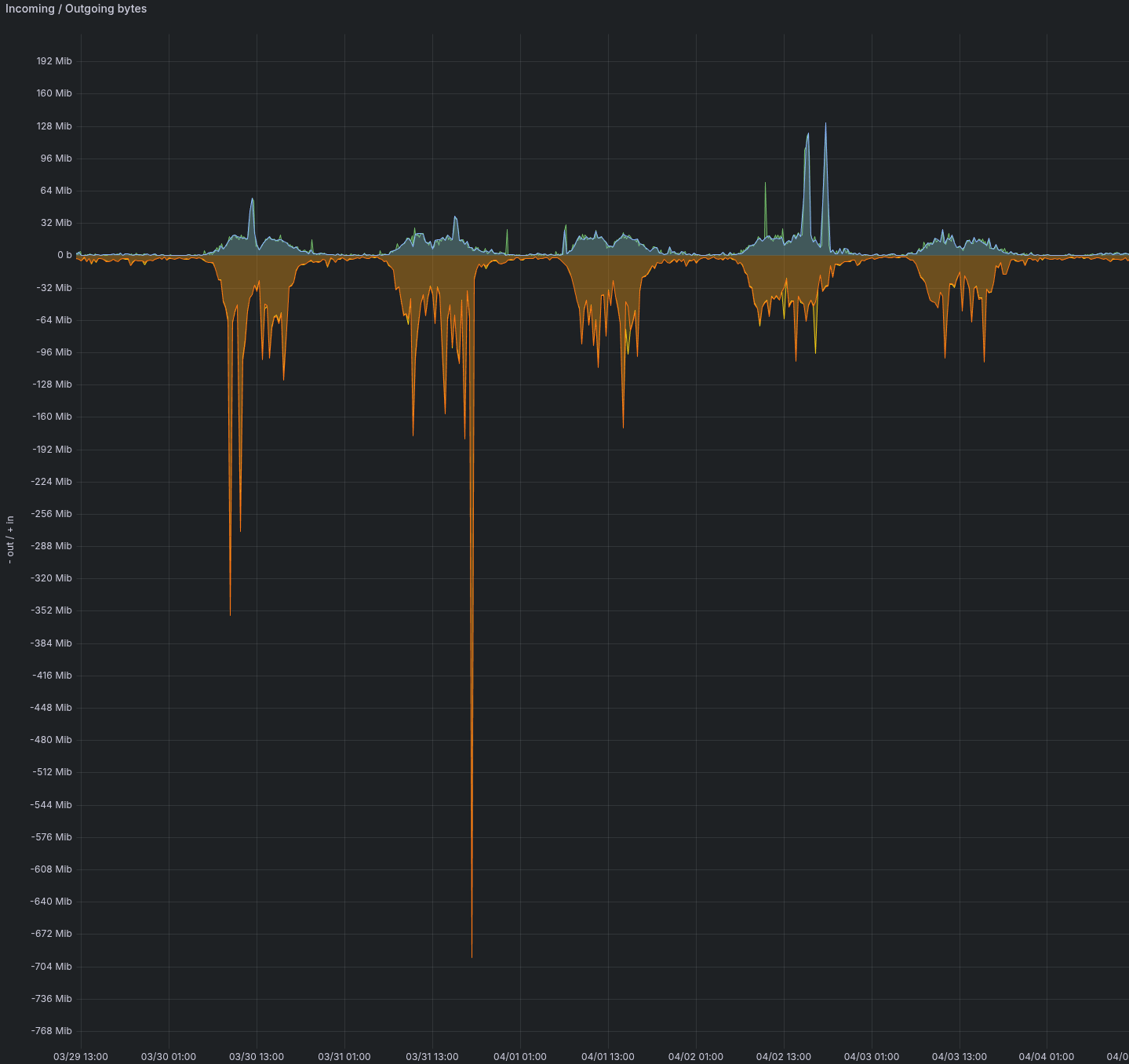
Characteristics of the measured installation:
- 10,000 users of the mail app only
- 2,000 advanced collaborative users
- > 2,000 smartphones connected via EAS
- Email client mix: 70% MailApp, 30% Thunderbird
Key takeaways:
- Significant asymmetry: Outgoing traffic (server → → → clients) is significantly higher than incoming traffic, consistent with the mail app usage where users download more than they send.
- Clear day/night cycle: Activity drops to nearly zero at night and on weekends, then spikes sharply in the morning as people log in.
- Broadcast peaks of several hundred Mib/s at the output (note: megabits, not megabytes; the graph axis is in
Mib), typical of mass communications relayed to thousands of recipients simultaneously. - Daily plateau of several tens of Mib/s at the output, representing normal activity.
Sizing should be based on observed peaks, not on the average or the daily plateau.
Best practices
Design for peak load
A system must be sized for its peak load, not for its steady-state load or average load. A corporate mail app has certain typical spikes that must be taken into account:
- Early morning logins: Most users log in during the same 15-minute window at the start of the day, triggering the synchronization of all emails received since the previous day. Don't forget about newsletters and mass communications sent to all staff, which arrive simultaneously in everyone's inboxes.
- Big Bang Migration: During a switchover, all servers are synchronized on the same day. Even with a webmail population, differential syncs must be initiated: the lists of emails in the various folders are retrieved, even if the content is not downloaded at this stage.
Planning Email Storage Capacity
The daily volume of incoming emails must be known and built-in to disk sizing, regardless of user quotas.
Retention mechanisms (double-bottom trash can, backups, archiving) keep a copy of emails even after they have been processed on the user's end. Example: For 20 GB of incoming emails per day and a 30-day retention period with double backup, you need to allocate at least 600 GB to handle this traffic — even if the recipients read and delete these emails within the same day.
Set a maximum email size
As a reminder, on BlueMind installations, 80% of emails are less than 128 KB and 95% are less than 1 MB.
The maximum size configured for emails is used by the system as an indicator to pre-reserve disk space: since the SMTP protocol transmits data without announcing its size in advance, BlueMind must size its receive buffer to the maximum allowed value (simplified explanation; the actual mechanism is more sophisticated, involving a dedicated mmap-pool and optimizations based on memory pressure; see the /var/mmap-pool row in the mount points table).
In addition, third parties with whom users communicate will generally not accept emails larger than 100 MB. The mail app is not a document management tool: BlueMind allows you to detach attachments and integrates with Nextcloud for sharing large files (see the section at File hosting).
Recommendation: Avoid allowing more than 30 to 35 MB per email. Furthermore, emails can pile up in outboxes, leading to confusion among users (internal recipients receive them, while external recipients do not).
Example of sizing
This section details how the above rules are applied across four specific architectures, from the user/client level down to the physical resources to be provisioned. The figures are for illustrative purposes only and are intended to be adjusted based on field observations: they are meant to serve as a basis for discussion rather than as a set of guidelines.
The tables on this page provide dimensioning calculated for peak loads— — —such as simultaneous morning arrivals, mass transit, and big-bang migrations, etc. This is the theoretical target sizing, which ensures the safety of a new installation without knowing its actual operating conditions.
In practice, BlueMind runs very well on significantly less powerful systems. Once we observe the actual load of a target system (actual volume, mix of uses, hourly distribution, customer behavior), many theoretical assumptions can be relaxed without compromising the user experience.
Only a test conducted with our integrators can determine exactly where to apply these margins and by how much — This is the step that transforms a theoretical design into an operational design optimized for the client’s specific context.
Assumptions made
The costs per unit are based on the table of profiles further up on this page. For this example:
| Population in the example | Selected profile | Units |
|---|---|---|
| TB or MailApp user with a connected smartphone | Mail App + Intensive Collaboration (4 GB) | 2 |
| TB or MailApp user without a connected smartphone | Mail app (2 GB) | 1 |
| Full-featured collaborative Outlook user (MAPI 10 GB) | Mail app + Collaboration + MAPI (10 GB) | 5 |
| High-quota account (top 2%, 50 GB) | Mail app + Collaboration + MAPI (50 GB) | 25 |
| Inactive mailbox (department, alias, non-screen employee) | ≈ 30% of a "mail app-only" plan | 0.3 |
Observed quota distribution. On existing installations, we see a fairly stable quota distribution: approximately 2% of mailboxes have a 50 GB extended quota (executives, archiving, specific accounts), 10% have a 10 GB quota (intensive collaboration, typically Outlook MAPI), and the rest fall between 1 and 2 GB. For the calculations below:
- The 10 GB cohort is explicitly represented by users with full Outlook collaboration capabilities in architectures B and C, and is by design absent in A (no MAPI deployed);
- The 50 GB cohort is added to each architecture as 2% of the total number of mailboxes — It is not insignificant in terms of units (× 25) or disk space (× 50 GB), even when there is no large-scale MAPI deployment.
The weighting of 0.3 applied to less active mailboxes is the most uncertain assumption in this example: it reflects the idea that these mailboxes are not constantly connected (functional mailboxes, aliases, or accounts without a dedicated workstation). This is typically the value that should be recalibrated first in a similar system.
Architecture A — 20,000 mailboxes, Thunderbird + MailApp
An organization focused on the mail app and light collaboration, without MAPI deployed. The 10 GB cohort is absent by design; the 50 GB cohort (2%) remains present (archives, specific accounts). Field data: At the reference site, 2,300 out of 5,000 users have a smartphone connected to BlueMind (≈ 46%); the remaining 2,700 access their email accounts exclusively via webmail or a desktop client.
| Population | Headcount | Units/Profile | Total units |
|---|---|---|---|
| TB or MailApp user with a smartphone (4 GB) | 2,300 | 2 | 4,600 |
| TB or MailApp user without a smartphone (2 GB) | 2,700 | 1 | 2,700 |
| High-quota accounts (top 2%, 50 GB) | 400 | 25 | 10,000 |
| Low-activity accounts | 14,600 | 0.3 | 4,380 |
| Total | 20,000 | 21,680 units |
Application of the tables:
- CPU: over 6,000 units → 2 cores / 1,000 units ⇒ ≈ 44 cores Zen 4 reference (≈ 36 cores on a Xeon Gold 6542Y, ≈ 34 cores on an EPYC 9755; see CPU Generation Equivalencies).
- RAM: 10,000+ tier ⇒ 96 GB with
bm-elasticsearchrunning on a separate server. - Email volume (theoretical maximum based on quotas): 2,300 × 4 GB + 2,700 × 2 GB + 400 × 50 GB + 14,600 × 2 GB = ≈ 64 TB. With a typical observed fill rate of 30% to 50%, expect 19–32 TB of usable storage. In object storage, this volume resides in the bucket (see Associated object storage (see below); in local storage, it would be located at
/var/spool/cyrus/data. /var/lib/postgresql: ~5% of the email volume ⇒ 1.0–1.6 TB./var/spool/bm-elasticsearch: ~10% of the email volume ⇒ 1.9–3.2 TB.
Proposed VM partitioning (object-stored emails):
| VM / role | vCPU | RAM | Local storage |
|---|---|---|---|
| BlueMind Heart | 20 | 96 Go | 200 GB NVMe (OS, /var/log, /var/spool/bm-mail, /var/spool/bm-mapi, /tmp, caches) |
PostgreSQL (bj-data database) | 16 | 40 GB | 2.1 TB NVMe for /var/lib/postgresql (≈ 2 TB; OS and logs ≈ 0.1 TB — ; email blobs are attached) |
| ElasticSearch | 8 | 32 GB | 4 TB NVMe for /var/spool/bm-elasticsearch |
| Total | 44 | 168 GB | ≈ 6.3 TB |
vCPUs expressed in cores Zen 4 9654 reference (see CPU Generation Comparisons); storage calibrated using a Samsung PM1733 NVMe drive in direct-attached mode — virtualization layers and network storage introduce additional latency, most of which is absorbed by the /var/mmap-pool buffer (see Minimum disk performance and capacity requirements).
Related object storage:
| Volume / bucket | Estimated volume | Description |
|---|---|---|
| Email list | 19–32 TB | Email storage, accessed via S3 by BlueMind |
Architecture B — 8,000 mailboxes, Outlook MAPI server farm
A fully collaborative Outlook-based organization (10 GB quota), with additional functional mailboxes and the standard 50 GB quota.
| Population | Headcount | Units/Profile | Total units |
|---|---|---|---|
| Fully collaborative Outlook (MAPI) | 5,000 | 5 | 25,000 |
| High-quota accounts (top 2%, 50 GB) | 160 | 25 | 4,000 |
| Functional/service boxes | 2,840 | 0.3 | 852 |
| Total | 8,000 | 29,852 units |
Smartphones connected to BlueMind: Connecting your phone to your work mail app is a personal decision (company-issued phone, BYOD, right to disconnect). Across the observed installations, approximately 30% of actual users — —that is, human mailboxes, excluding functional/service mailboxes — —connect their phones, amounting to ~1,550 smartphones on this architecture (≈ 1,240 EAS + 310 IMAP only).
Application of the tables:
- CPU: 29,852 units ⇒ ~60 cores Zen 4 reference (≈ 49 on a Xeon Gold 6542Y, ≈ 46 on an EPYC 9755).
- RAM: ≫ 10,000 units ⇒ 96 GB per node; remote ES required.
- Email volume (theoretical maximum based on quotas): 5,000 × 10 GB + 160 × 50 GB + 2,840 × 2 GB ≈ 64 TB max ⇒ 20–32 TB realistic. In object storage, this volume resides in the bucket (see Associated object storage (see below); in local storage, it would be located at
/var/spool/cyrus/data. /var/lib/postgresql: ~5% of the email volume ⇒ 1.0–1.6 TB./var/spool/bm-elasticsearch: ~10% of the email volume ⇒ 2.0–3.2 TB.- DataProtect Backup: email volume > 1 TB ⇒ as indicated in the Storage / IO table, disable DataProtect for emails at this volume and switch to a third-party backup strategy + double-bottom trash can.
Proposed VM partitioning (object-stored emails):
| VM / role | vCPU | RAM | Local storage |
|---|---|---|---|
| BlueMind Heart | 28 | 96 Go | 200 GB NVMe (OS, /var/log, /var/spool/bm-mail, /var/spool/bm-mapi, /tmp, caches) |
PostgreSQL (bj-data database) | 20 | 48 GB | 2.1 TB NVMe for /var/lib/postgresql (≈ 2 TB; OS and logs ≈ 0.1 TB — ; email blobs are attached) |
| ElasticSearch | 12 | 48 GB | 4 TB NVMe for /var/spool/bm-elasticsearch |
| Total | 60 | 192 GB | ≈ 6.3 TB |
vCPUs expressed in cores Zen 4 9654 reference (see CPU Generation Comparisons); storage calibrated using a Samsung PM1733 NVMe drive in direct-attached mode — virtualization layers and network storage introduce additional latency, most of which is absorbed by the /var/mmap-pool buffer (see Minimum disk performance and capacity requirements).
Related object storage:
| Volume / bucket | Estimated volume | Description |
|---|---|---|
| Email list | 20–32 TB | Email storage, accessed via S3 by BlueMind |
At 29,852 units (~60 Zen 4 cores), a single VM combining a core, PostgreSQL, and ElasticSearch would far exceed the VM sizes recommended by hypervisors (typically ~8 vCPUs). The scaling then splits up the resource-intensive roles: a dedicated ElasticSearch server and a dedicated PostgreSQL server, which reduces the size of each VM to a manageable level. If possible, placing the ES and/or PostgreSQL VM on separate hypervisors (and separate network cards) provides additional resilience in the event of a host failure.
The PostgreSQL server hosts the bj-data database, which contains most of the BlueMind tables related to the mail app. With object storage, email blobs are stored in the bucket, and the PostgreSQL VM becomes significantly lighter: it is in this context that separating it from the core is easiest to implement (the sizing table above illustrates this: 16–20 vCPUs, 40–48 GB, ~2 TB of /var/lib/postgresql, and that’s it). With local storage, on the other hand, PostgreSQL and the email filesystem are kept under /var/spool/cyrus/data on the same machine: moving PostgreSQL would require every email access to make an extra network hop between the database and the blobs, resulting in a performance cost that outweighs the benefits of a separate VM. On a large scale, this same machine then hosts both the base and the blobs and handles the majority of I/O; we allocate the appropriate hardware (fast NVMe, sustained I/O, RAM) to it rather than splitting the function.
C Architecture — 1,000 mailboxes, small Outlook MAPI environment
A small MAPI organization, with a significant number of shared mailboxes and non-desktop users, and the usual 50 GB quota (now limited to a few accounts).
| Population | Headcount | Units/Profile | Total units |
|---|---|---|---|
| Fully collaborative Outlook (MAPI) | 500 | 5 | 2,500 |
| High-quota accounts (top 2%, 50 GB) | 20 | 25 | 500 |
| Shared mailboxes / non-screen staff | 480 | 0.3 | 144 |
| Total | 1,000 | 3,144 units |
Smartphones connected to BlueMind: ~30% of actual users (excluding shared mailboxes / non-screen staff) ⇒ ~155 smartphones (≈ 125 EAS + 30 IMAP only).
Application of the tables:
- CPU: 3,000–6,000 units ⇒ 12 cores Zen 4 reference (≈ 10 cores on a 6542Y, ≈ 9 cores on a 9755).
- RAM: 2,500–5,000 units ⇒ 48 GB.
/var/spool/cyrus/data: 500 × 10 GB + 20 × 50 GB + 480 × 2 GB ≈ 7 TB max ⇒ 2–3.5 TB realistic./var/lib/postgresql: ~5% ⇒ ~0.1–0.2 TB./var/spool/bm-elasticsearch: ~10% ⇒ ~0.2–0.4 TB.
Proposed VM configuration (single VM, local storage):
| VM / role | vCPU | RAM | Local storage |
|---|---|---|---|
| Single BlueMind VM | 12 | 48 GB | 5 TB NVMe (/var/spool/cyrus/data ≈ 3.5 TB, bm-elasticsearch ≈ 0.4 TB, postgresql ≈ 0.2 TB, OS / logs / others ≈ 1 TB) |
vCPUs expressed in cores Zen 4 9654 reference (see CPU Generation Comparisons); storage calibrated using a Samsung PM1733 NVMe drive in direct-attached mode — virtualization layers and network storage introduce additional latency, most of which is absorbed by the /var/mmap-pool buffer (see Minimum disk performance and capacity requirements).
The C architecture runs comfortably on a single VM using storage provided by the hypervisor: at this scale, the additional operational costs of a multi-server cluster or an object-based backend are not justified.
Architecture D — 3,000 Thunderbird mailboxes, single VM
This architecture illustrates a deployment for 3,000 Thunderbird users, each with one smartphone (EAS or IMAP), a uniform quota of 10 GB per mailbox, without MAPI, and without object storage — with the goal of running everything on a single VM using storage provided by the hypervisor.
| Population | Headcount | Units/Profile | Total units |
|---|---|---|---|
| Thunderbird + smartphone (10 GB) | 3,000 | 2 | 6,000 |
| Total | 3,000 | 6,000 units |
At 10 GB per mailbox without MAPI, we estimate 2 units per user: this is the lower limit of the estimate, as IMAP/EAS places significantly less load on the server than MAPI at the same quota. For very intensive use (large volumes of attachments synced to smartphones, frequent full-text searches), it may be prudent to aim for 2.5–3 units, which would require moving Elasticsearch to a dedicated server.
Application of the tables:
- CPU: 6,000 units ⇒ 12 cores Zen 4 reference (≈ 10 cores on a Xeon Gold 6542Y, ≈ 9 cores on an EPYC 9755) — available on a single modern socket.
- RAM: The table lists 5,000–10,000 units at 64 GB with off-board ES. To host ElasticSearch on the same VM, allocate 96 GB to accommodate its heap without causing memory pressure.
/var/spool/cyrus/data: 3,000 × 10 GB = 30 TB max ⇒ 9–15 TB (realistic estimate, 30–50% utilization), fully accessible on the storage provided by the hypervisor (vSAN, VMFS datastore, high-performance NFS, etc.)./var/lib/postgresql: ~5% ⇒ 0.5–0.8 TB./var/spool/bm-elasticsearch: ~10% ⇒ 0.9–1.5 TB.
Proposed VM configuration (single VM, local storage):
| VM / role | vCPU | RAM | Local storage |
|---|---|---|---|
| Single BlueMind VM | 12 | 96 Go | 18 TB NVMe (/var/spool/cyrus/data ≈ 15 TB, bm-elasticsearch ≈ 1.5 TB, postgresql ≈ 0.8 TB, OS / logs / others ≈ 1 TB) |
vCPUs expressed in cores Zen 4 9654 reference (see CPU Generation Comparisons); storage calibrated using a Samsung PM1733 NVMe drive in direct-attached mode — virtualization layers and network storage introduce additional latency, most of which is absorbed by the /var/mmap-pool buffer (see Minimum disk performance and capacity requirements).
This architecture runs very smoothly on a VMware vSphere hypervisor: a single VM with 12 vCPUs and 96 GB of memory, backed by storage provided by the hypervisor (vSAN, SAN datastore, high-performance NFS, etc.), and vMotion to move the VM between hosts during maintenance operations without any downtime for users. To stay within the 8 vCPU limit imposed by certain HA options (typically VMware Fault Tolerance), an alternative architecture offloads ElasticSearch: Main VM with 8 vCPUs + 64 GB and ES VM with 4 vCPUs + 32 GB (see the sidebar Why offload bm-elasticsearch?).
High availability
In the architectures described above, high availability is primarily ensured by the hypervisor layer and the underlying storage components, without any specific configuration on the BlueMind side:
- VMware vSphere: vMotion moves VMs between hosts while they are running for maintenance operations (without user downtime); vSphere HA automatically restarts a VM on another host in the event of a node failure, with a brief interruption during the restart.
- Proxmox + Ceph: Ceph's multi-node replication protects data blocks, and Proxmox's live migration enables the hot migration of VMs between hosts in the cluster.
- Proxmox + Local ZFS: Snapshots and asynchronous ZFS replication to a secondary node provide protection against host failure with an RPO of just a few minutes, while maintaining the latency of a local disk.
This infrastructure covers the most common outages (loss of a host, scheduled maintenance) with RPOs and RTOs ranging from a few seconds to a few minutes.
Going Beyond — Synchronous replication of BlueMind instances and cross-site application failover — is possible, but any lossless synchronous replication depends on the underlying network. The latency of cross-site writes adds to the synchronous writes performed by PostgreSQL and the email database, and can significantly degrade perceived performance as soon as the sites are geographically distant or the latency exceeds a few milliseconds.
Choosing a high-availability architecture involves balancing two factors:
- Types of connected clients. Outlook (MAPI) does not handle asynchronous replication well; it treats it as a return in time in the event of an abrupt switchover — which can result in resource-intensive resynchronization, duplicates, or missing items. The MailApp and ActiveSync clients reconnect more smoothly and handle brief disconnections or IP address changes more effectively.
- RPO and RTO required. An RPO of a few minutes (asynchronous replication) meets most business needs without impacting performance. An RPO close to zero requires synchronous replication, which imposes significant network constraints (sub-millisecond latency between sites, link redundancy, and bandwidth sized to handle peak I/O).
This is an issue that needs to be discussed with our integrators based on the client’s specific context: sites, available inter-site latency, client mix, and RPO/RTO contractual requirements.
To be calibrated under actual conditions
The figures above are based on the tables without any adjustments. The items that need to be addressed as a priority in the field:
- Cost of low-activity mailboxes (0.3 units used): to be recalibrated by examining the "concurrent sessions / open mailboxes" ratio on a comparable system. Depending on usage patterns (whether or not a mobile client is present, frequency of access), a realistic range would be between 0.1 and 0.5.
- 50 GB cohort share (2% retained): depending on the archiving policy and whether or not there are "exceptional" accounts (legal, HR, management), this share may vary from 0.5% to 5%. This has a significant impact in terms of units (×25) and disk space (×50 GB per account).
- Percentage of users with a connected smartphone: 46% assumed for A (based on an existing installation: 2,300 / 5,000), ~30% for B and C (based on the human population, excluding functional units), 100% for D (explicit assumption: one phone per person). This is an individual decision (work phone, BYOD, right to disconnect) that can vary significantly from one organization to another — Each user switches from 1 unit (without) to 2 units (with), so the coefficient is sensitive.
- Actual quotas vs. theoretical quotas: Email volumes are calculated based on the maximum quota; actual usage typically hovers around 30–50%.
- Morning peak load: The system must be sized to handle simultaneous demand between 8 a.m. and 9 a.m. and peak loads, not the daily average (see Best Practices > Sizing for Peak Load).
- Multi-server architecture: For more than ~6,000–10,000 units, spreading out resource-intensive roles (dedicated ElasticSearch, dedicated PostgreSQL — , which hosts the
bj-datadatabase) becomes more effective than using a single large VM. Separating PostgreSQL is easiest when using object storage: the database is then lightweight (without local blobs). With local storage, on the other hand, PostgreSQL and the mail filesystem are kept on the same machine to avoid a costly network hop every time the blobs are accessed.