Release Notes 5.0
In accordance with our release lifecycle policy, the end of support dates for BlueMind 5.0 are:
- bug support: 26/10/2024
- security support: 04/26/2025
With version 5, BlueMind is more than ever the sovereign alternative to Microsoft Exchange and 365, whether as a stand-alone collaborative mail solution or at the heart of the Digital Workplace.
The user experience is enhanced with a new, richer webmail and extended Outlook connectivity. Transitions to BlueMind are made easier, with key features from the Microsoft universe built-in.
Architectural changes and greater scalability increase collaborative capabilities and uses for organizations large and small.
Discover the major changes and new features of BlueMind in version 5.0.

Documentation
↳ A new organization of sections provides quicker, more intuitive access to the features you're looking for.
↳ 🇬🇧 The English translation is complete and up-to-date.
↳ 🇩🇪 The German translation is complete and up-to-date.
General
Delegation management
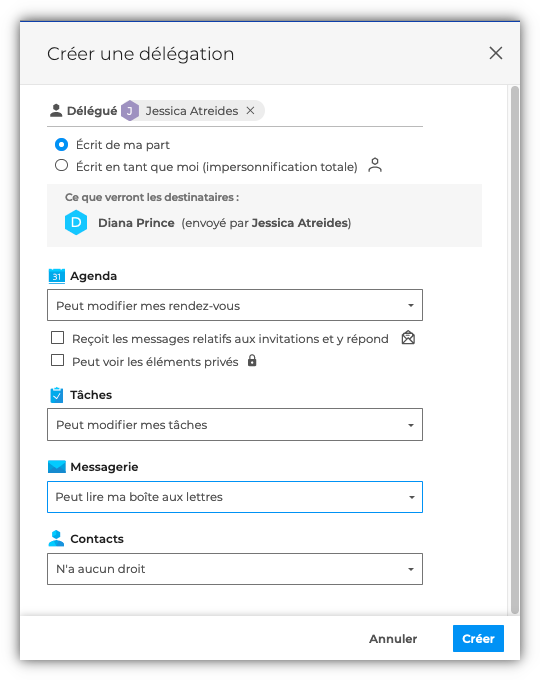
In addition to sharing rights, the new delegation management allows users to appoint delegates and define more detailed and targeted rights. Depending on the options chosen, the delegate can:
- to be written by the delegating user (see Write from me)
- write as the delegating user (see Write as me)
- manage the delegating user's invitations (see Receives and responds to my invitations)
Forwarding invitations
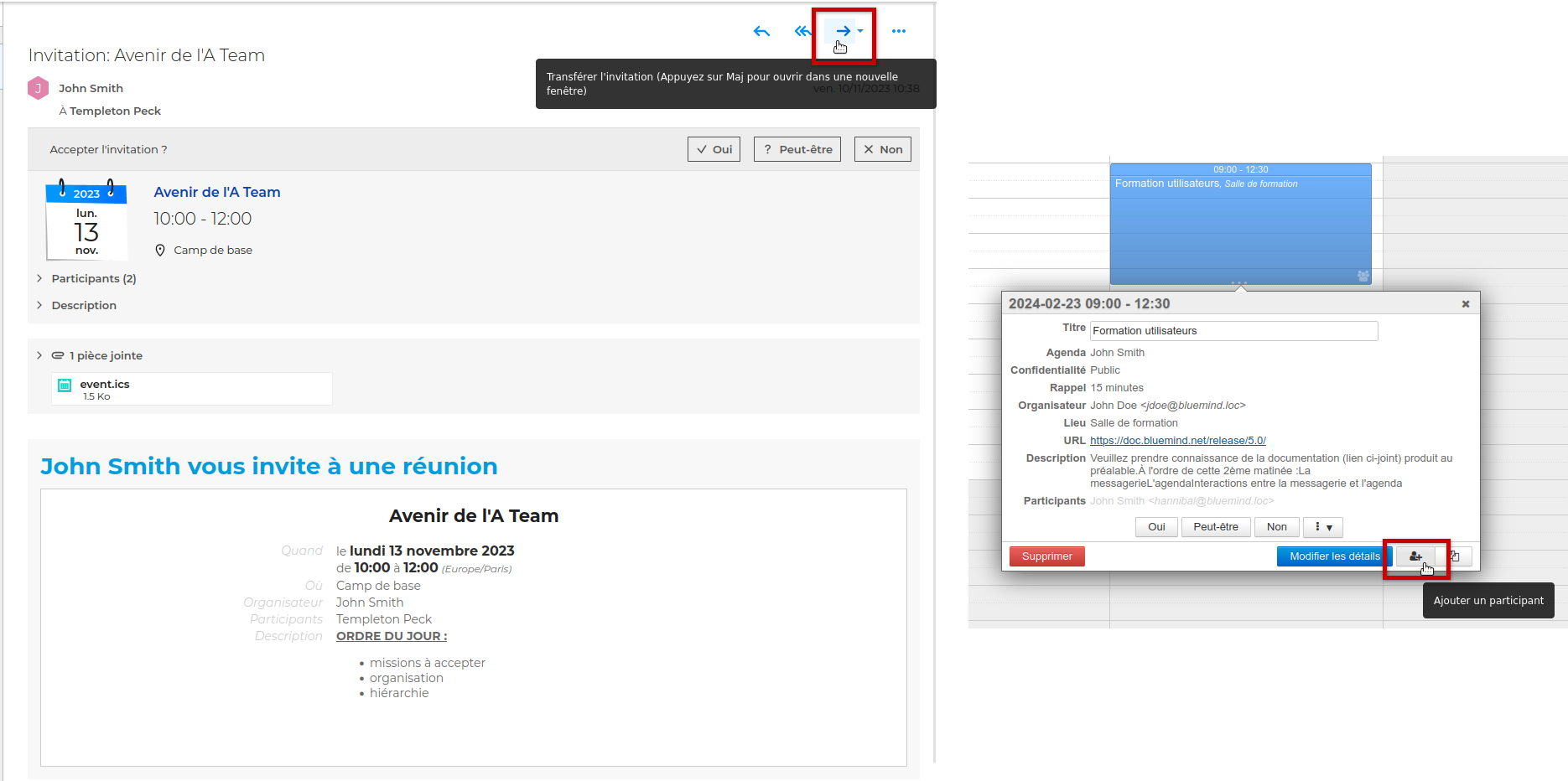
Invitation forward enables a participant to invite a third party to a meeting. They can do this in several ways:
- forwarding an invitation
- using a dedicated button directly in the calendar event:
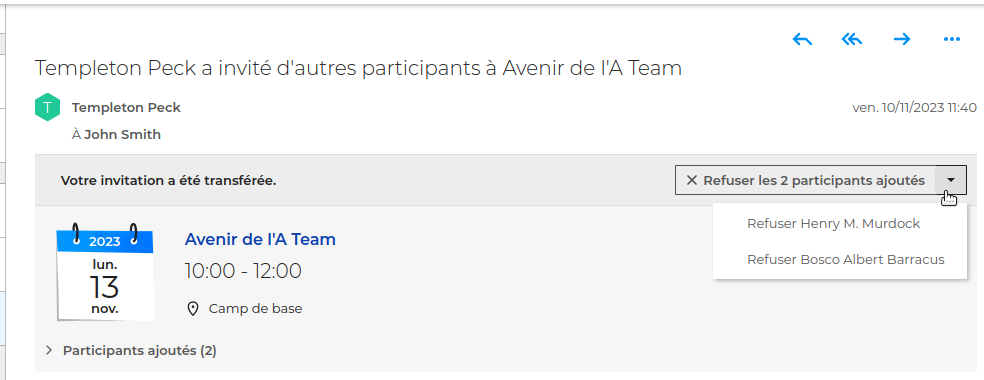
 Bonus BlueMind: the organizer is notified and can refuse added participants directly from the e-mail he receives!
CalDAV/CardDAV enhancements
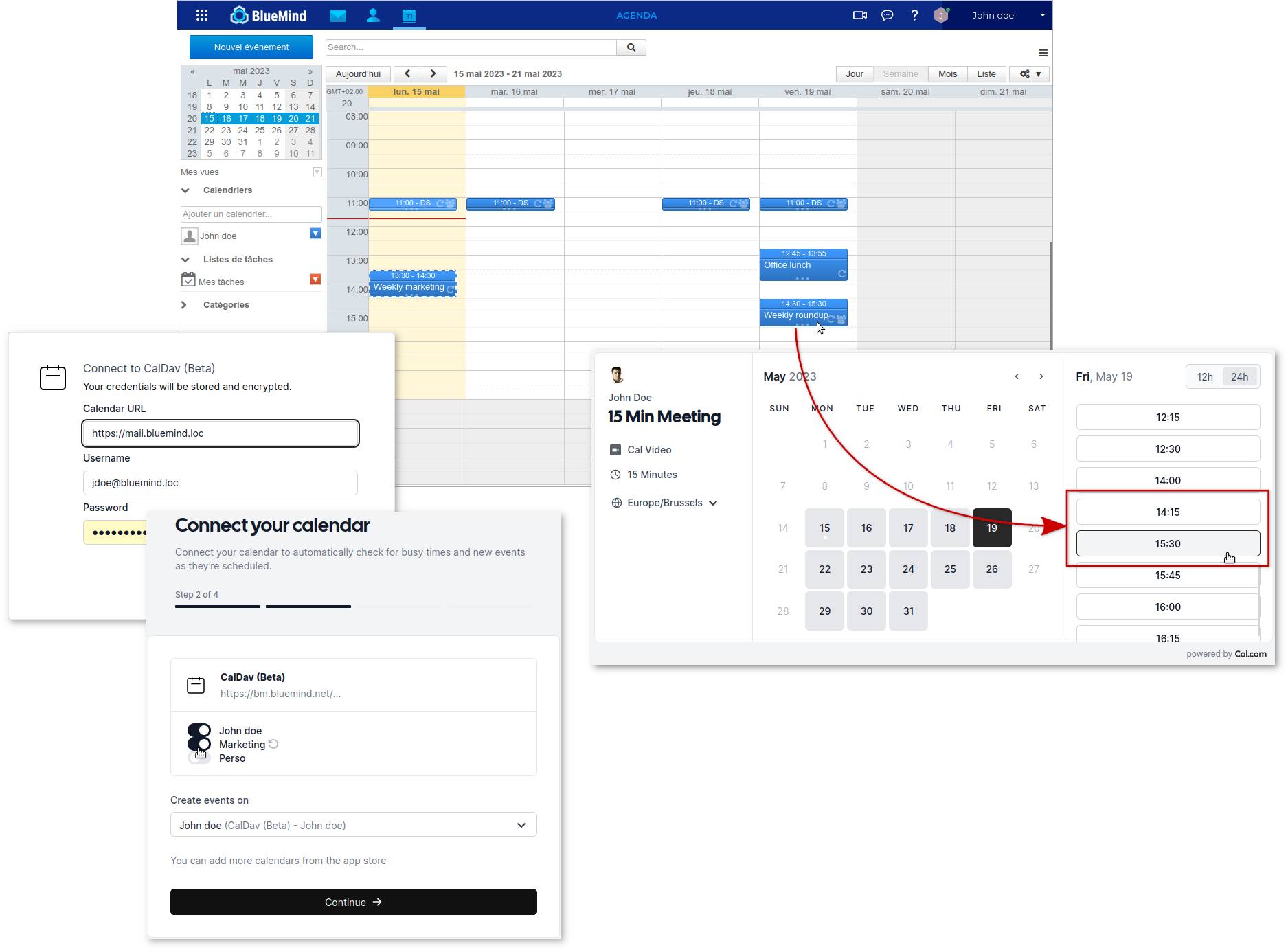
Enhanced support for the CalDAV and CarDAV protocols, enabling extension to services other than Mac OsX clients.
This opens up BlueMind's interoperability with external appointment scheduling services such as cal.com, SimplyMeet and Vyte.
Mail
The webmail developed by BlueMind becomes the only web mail client installed and offered to users.
Mail delegation
Delegation management allows users to fine-tune the sharing of their mailboxes. Users can now designate a delegate who can choose from :
- write on behalf of the user delegating : the emails sent will mention the actual sender of the message (see Write from me).
- write as the delegating user : this is a total impersonation, so recipients will not see that the e-mail was written by the delegated user. (see Write as me)
Set-up is intuitive and straightforward, eliminating the risk of error :

Forwarding invitations
Invitation transfer](#fwd-invitation) allows a participant to invite another person directly from the invitation e-mail.
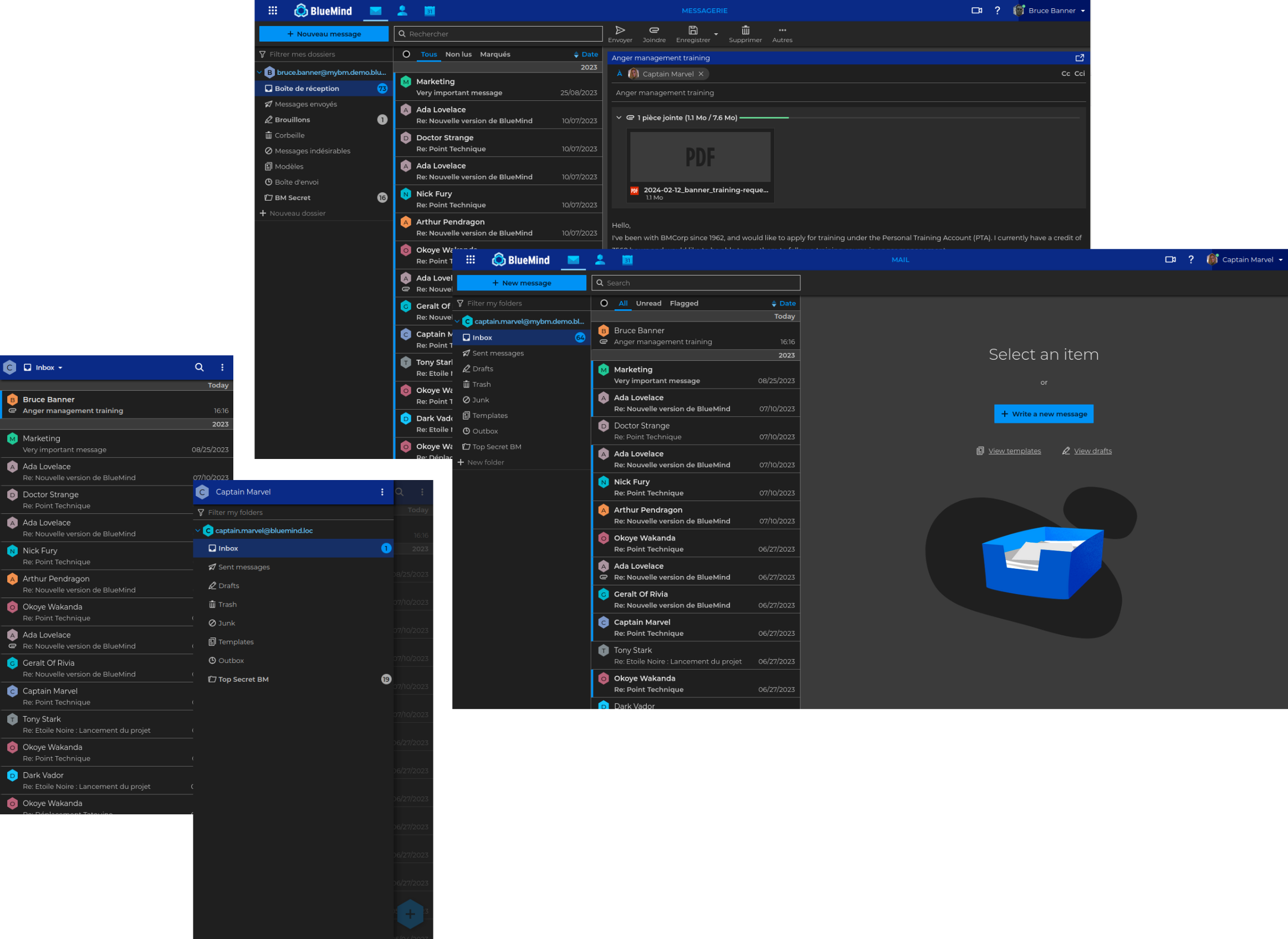
Dark mode
The long-awaited dark theme is finally available in BlueMind webmail!
Users can now choose their display mode to take advantage of their visual preferences right into BlueMind.
Built-in contacts
Several new features have been added to make contact management easier.
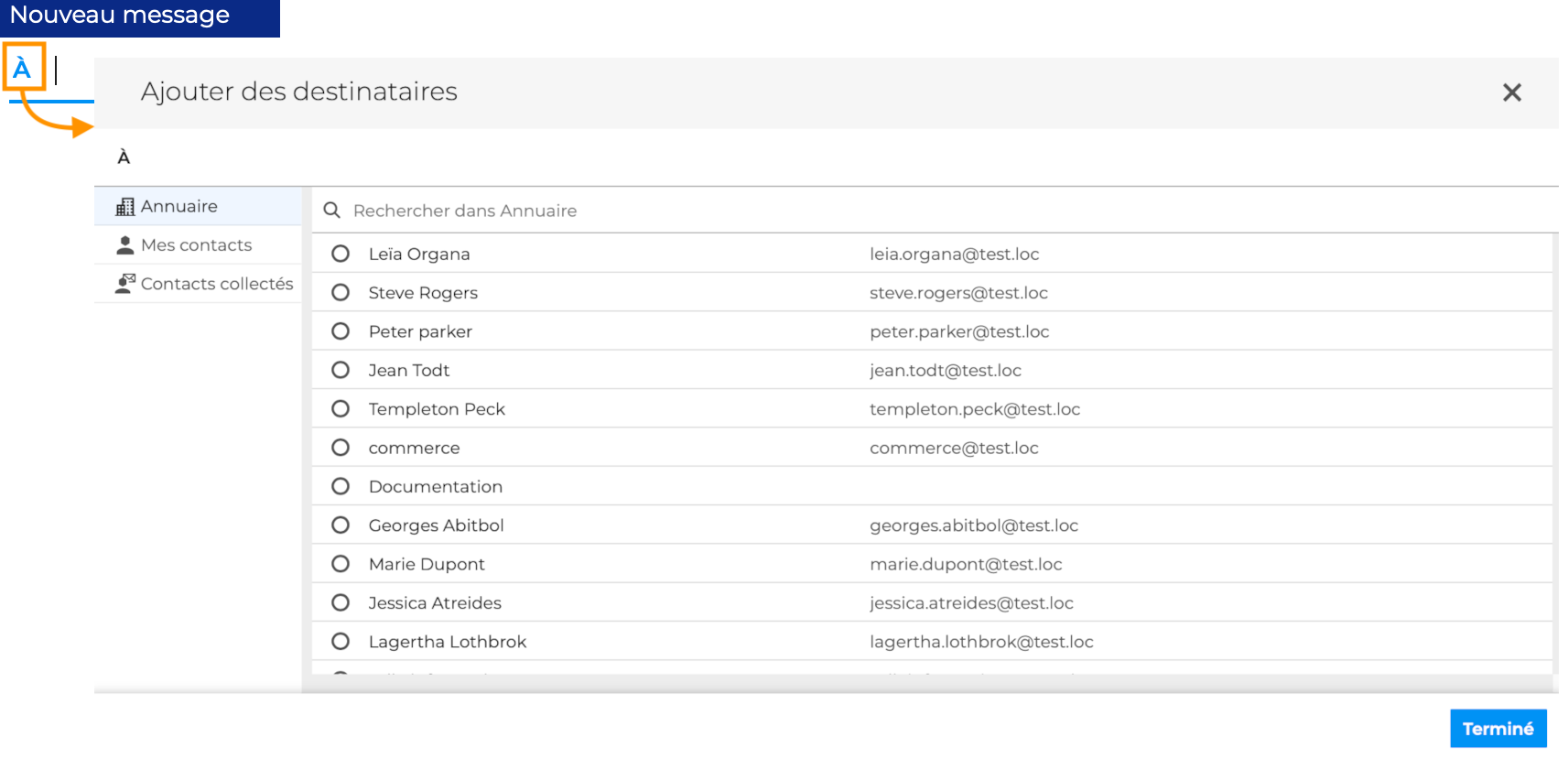
Users can now Choosing recipients directly from the webmail dialer :
- Browse your address books and add contacts, individually or by selection ranges :
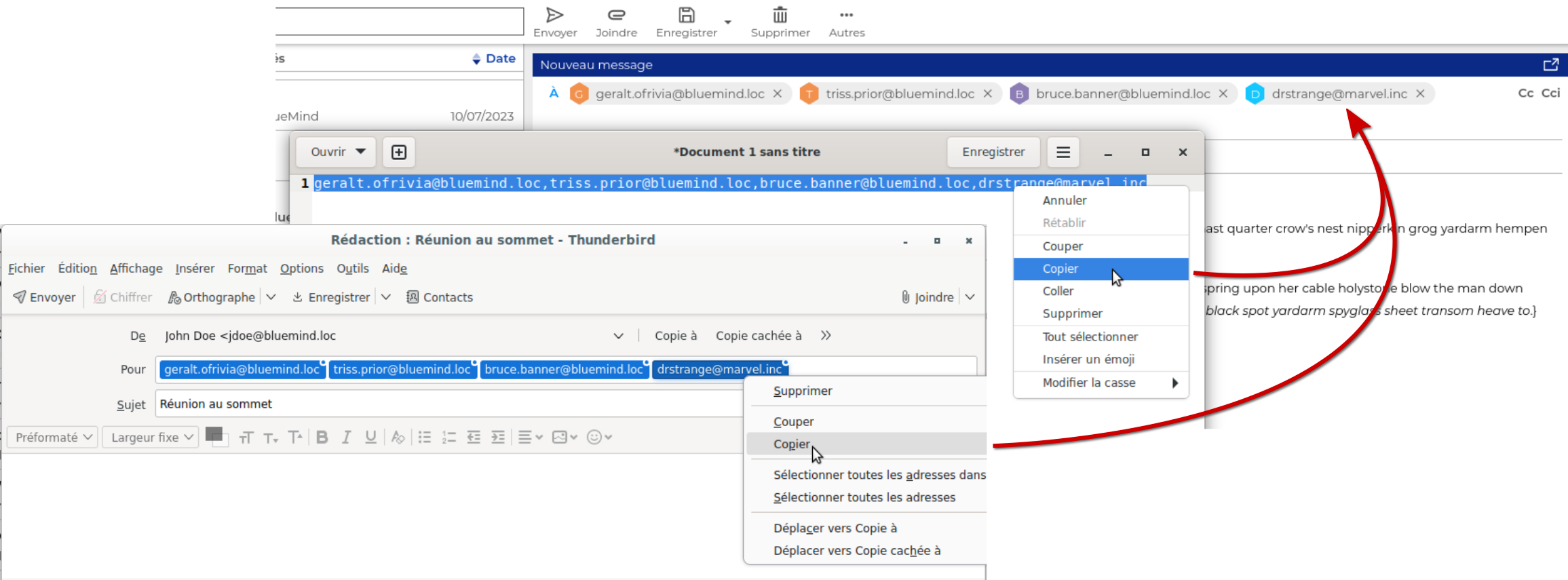
- Copy and paste address lists into dedicated fields (To, Cc, Bcc) :
Built-in BlueMind drive
User access to file storage space (drive) is enhanced by better built-in and new features.
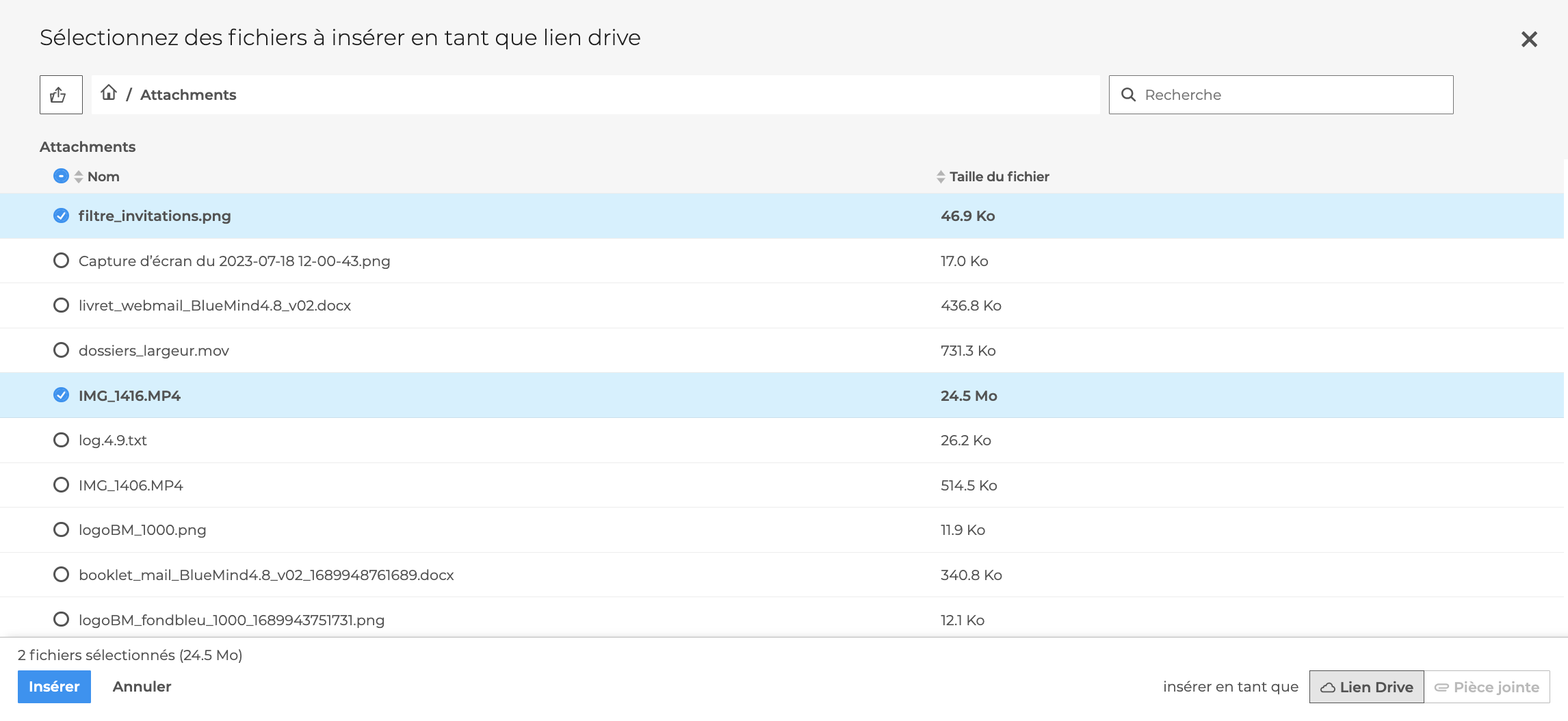
File selector
Add an attachment from DriveThe new file chooser interface makes it easy to find and attach an attachment :
Linked attachments
BlueMind 5 now includes the long-awaited ability to detach attachments!

With a simple click, the file is uploaded to the user's drive and deleted from the e-mail. Both the email and the user's quota are lightened, and when a reply is received or a message is forwarded, the recipient is offered a download link.
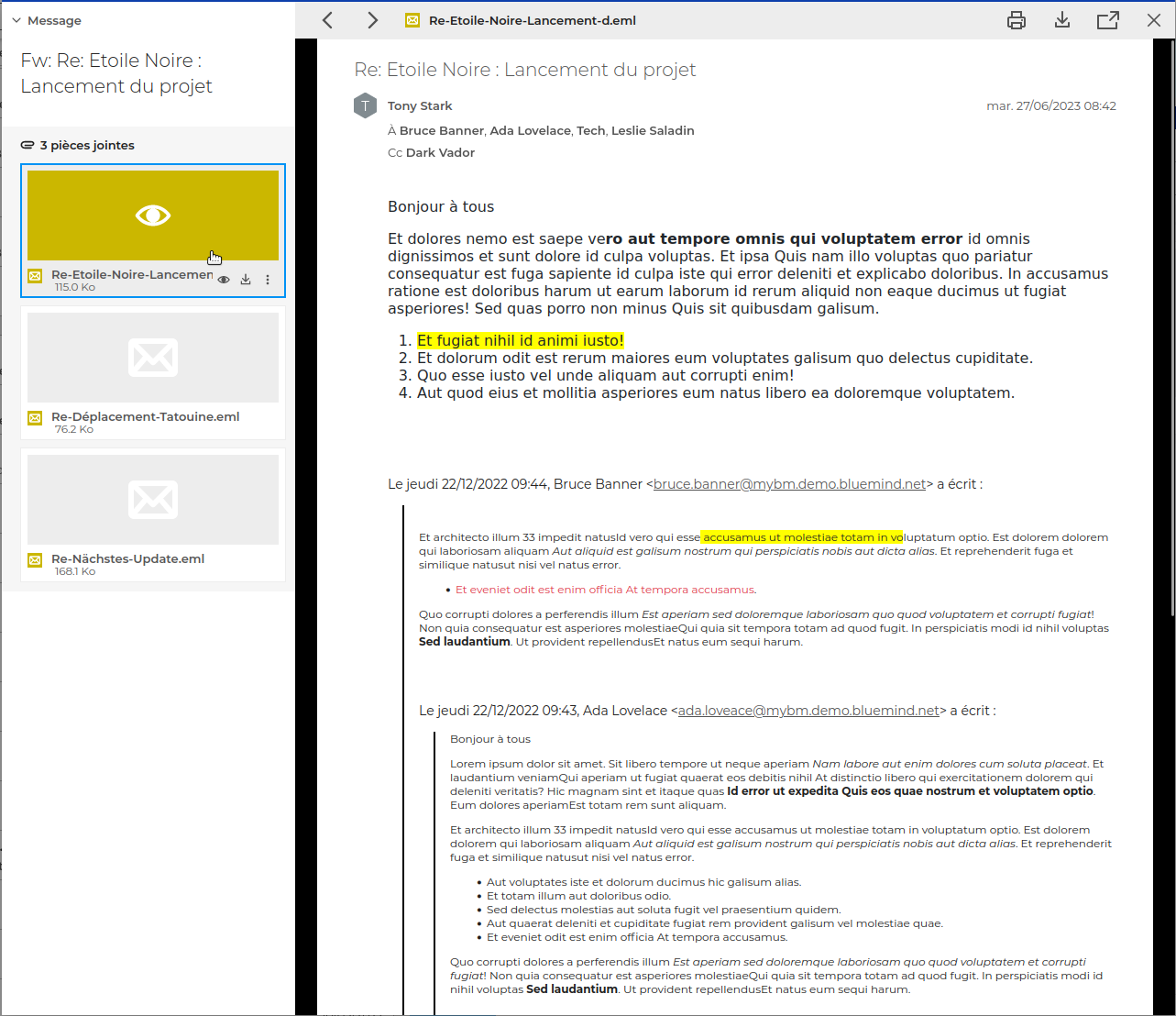
Preview attached emails
Emails attached to a message in .eml format can now be previewed like any other file, whether in a received or sent message.
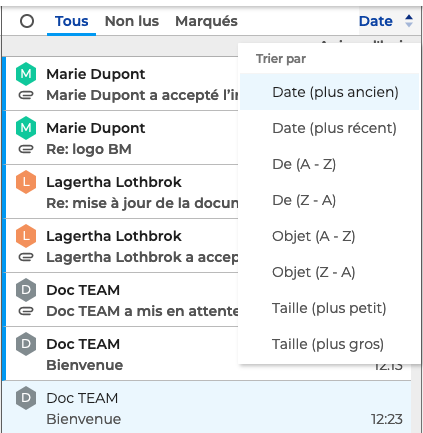
Sort emails
The list of emails is enriched with the possibility for the user to order the emails as he wishes :
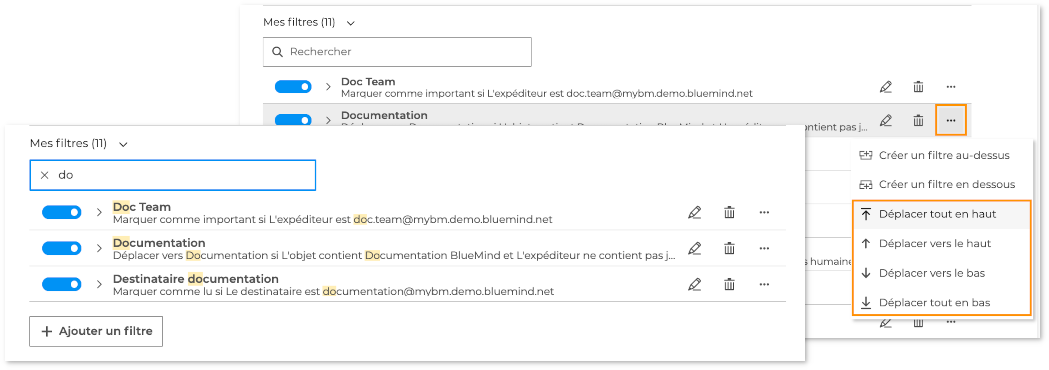
Filtering emails
The mail filter management interface has been enhanced with new functions for searching and ordering filters :
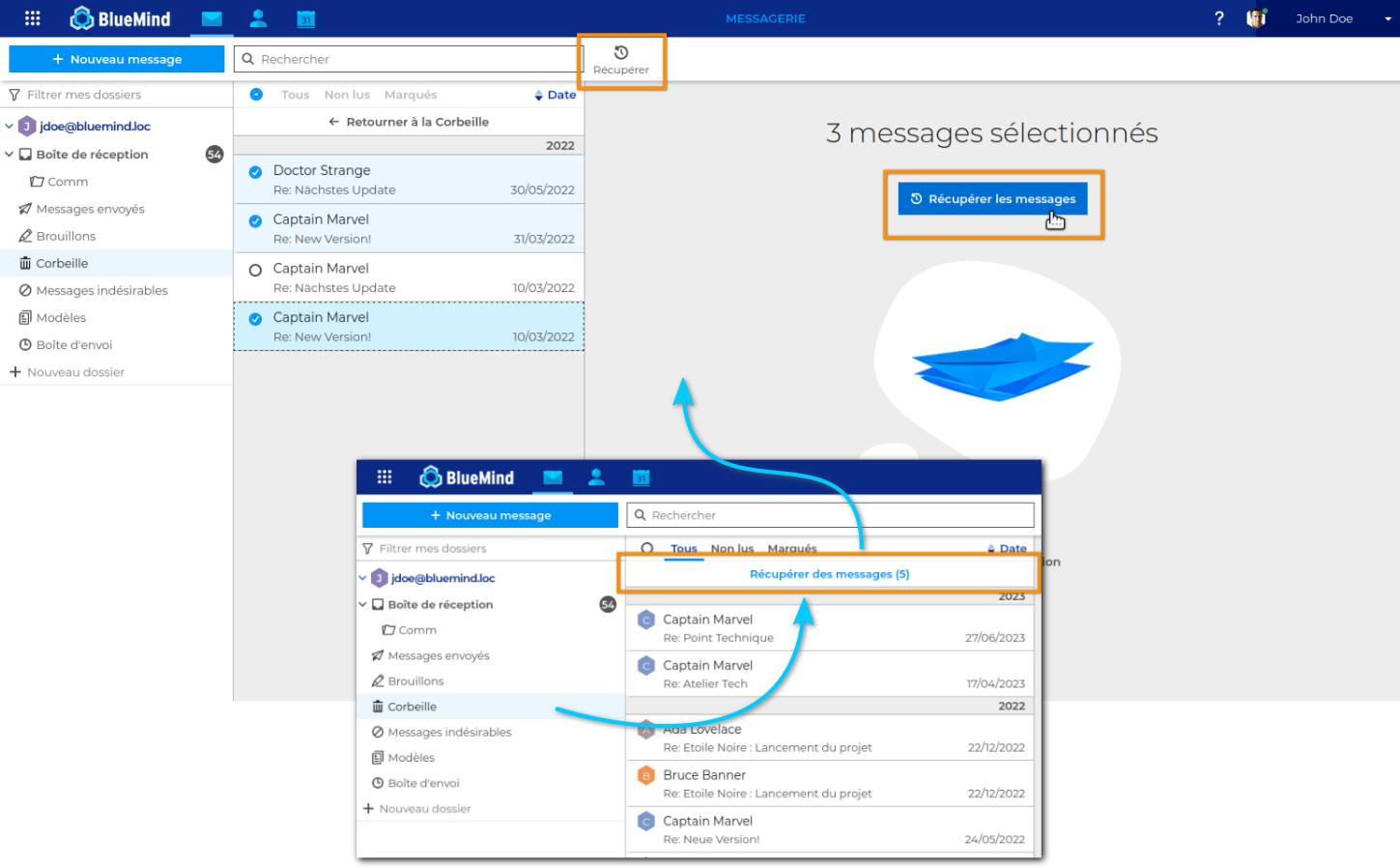
Double-bottom trash can
The trash now has a double background to compensate for deletions made by mistake : e-mails marked as permanently deleted can be retrieved directly from webmail for a certain period of time after deletion.
S/Mime
To enhance the security of email exchanges, BlueMind lets you encrypt confidential emails and/or verify the identity of senders and recipients with the electronic signature.
The electronic signature ensures that the email has not been altered and that there is no impersonation of the sender. Encryption** ensures that only the recipient can read the contents of the email.

To find out more about implementation, see the dedicated page in the administrator's guide : Configuring S/MIME
To find out more about how to use it, please consult the user guide at :
New illustrations
The webmail now features new, more modern and clearer illustrations.

Calendar
Delegations
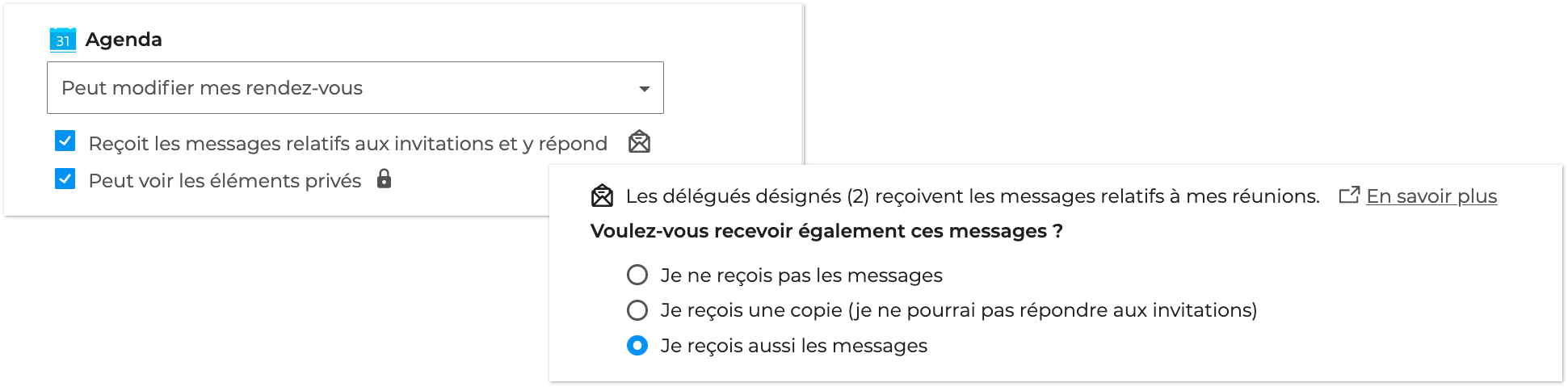
Delegation management allows a user to delegate the management of his calendar in reading or modification but also by setting the way in which the delegate will be able to act on the invitations received thanks to several options :
- whether or not Receives and responds to my invitations
- whether Can see my private events or not
- if he wishes to fully delegate this management by no longer seeing the invitations himself.
As with webmail, a clear interface lets users know exactly what they are activating and the corresponding behavior :
Forwarding invitations
Invitation transfer](#fwd-invitation) allows a participant to invite another person directly from the calendar event.
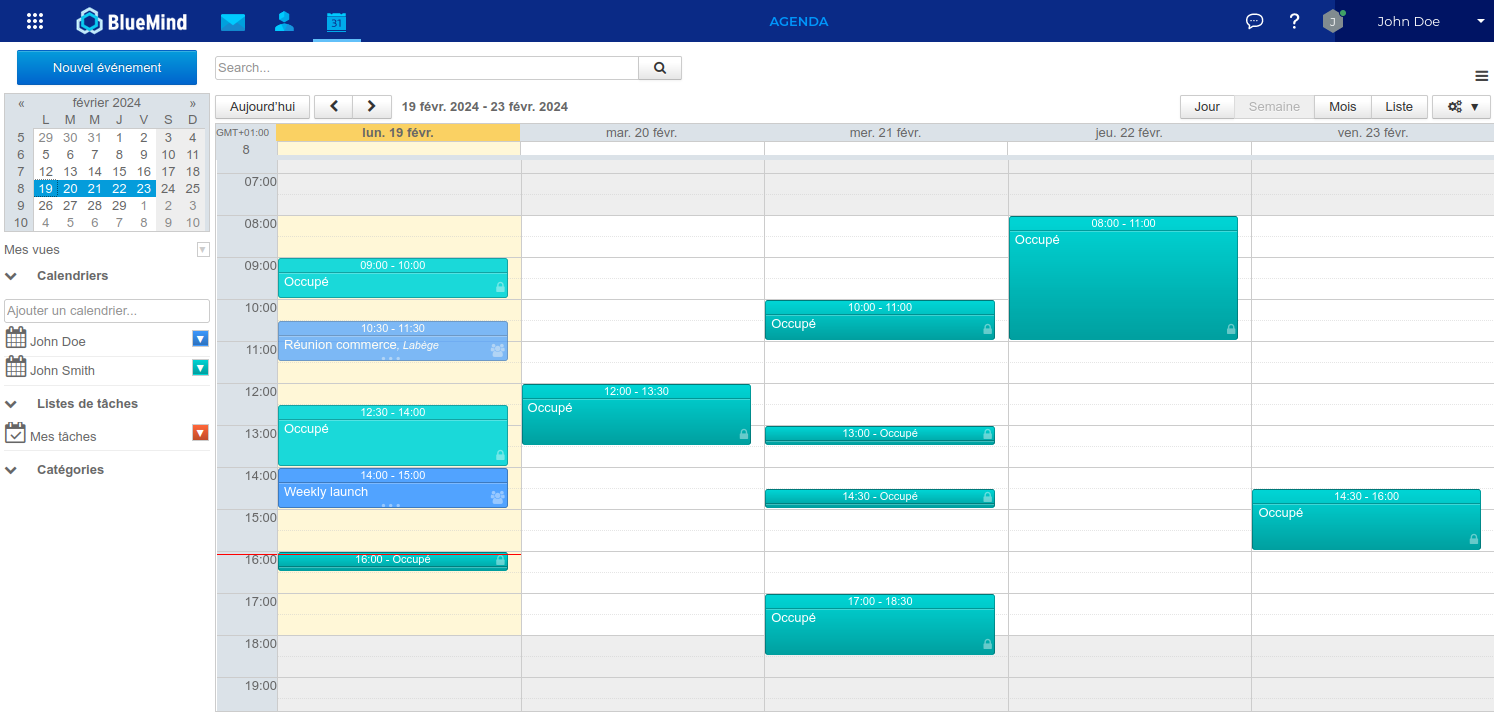
Availability view
A user's availabilities can be viewed in the main calendar view and not only in the availability search tab when creating an event :
Supporting the "cancelled" status of a meeting
When an organizer cancels a meeting, it is no longer removed from guests' calendars, but continues to exist in "cancelled" status; it can be displayed or hidden according to the "Show declined or cancelled events" setting.
Outlook
Delegations
The implementation of delegations in BlueMind is compatible with Outlook's delegated access management, provided that the settings are made on the BlueMind side: once the delegation has been created in BlueMind, the delegated user can write on behalf of or as the delegating user from his Outlook.
Forwarding invitations
The invitation forward familiar to Outlook users is now supported and compatible with BlueMind: whether a user uses Outlook or BlueMind applications, the effects of an invitation forward will be the same.
Built-in add-ins
As BlueMind is fully connected to Outlook in mapi, the connector is no longer needed and is discontinued.
However, BlueMind's built-in features (videoconferencing integration, linked attachments, etc.) add-ins will be added over time to enhance Outlook software and enable maximum interoperability between users of Outlook and BlueMind web applications. The same user will also be able to find in his Outlook the functionalities he benefits from when roaming on a mobile device or other workstation.
Adding videoconferences
The first feature of the BlueMind add-in is the ability to add a videoconference to an appointment, with a simple click from the appointment creation window:

Find out more in the documentation Working with Outlook > The calendar > Videoconferencing
Administration & operations
Auditlog
BlueMind 5 uses auditlog to obtain information on modifications made to certain BlueMind entities. User operations are saved and can be viewed via the CLI. The information saved, which is considered relevant to help understand the changes made, depends on the entities considered:
- For an e-mail, operations such as moving from one folder to another, or deleting a folder, are stored.
- For a calendar event, any changes are saved. For example, a change of venue will result in the creation of a new entry in the database, with an email indicating the changes made.
- Users login actions are stored.
- Actions to obtain/revoke user rights to calendars, mail folders, etc. are stored.
Improvements to the CLI
New commands have been added to CLI Admin Client, making BlueMind installation easier and more finely tuned, even in a multi-server architecture.
Single-user Restoration
Dataprotect navigation has been enhanced and extended to all entity types, with a wide choice of restoration options.
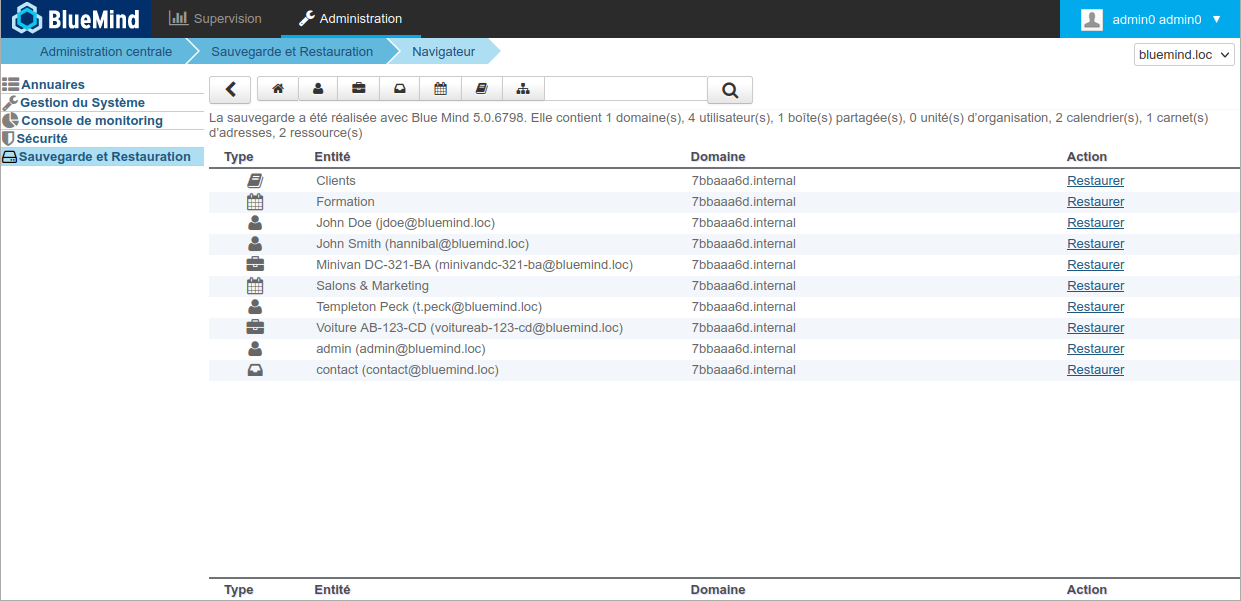
See the dedicated documentation page for all the restoration options for each type : Single-user restoration - DataProtect Navigator
Architecture
OpenID SSO
BlueMind implements the openID protocol in version 5. Although the technical implementation has changed, this brick replaces the internal SSO previously used in BlueMind, for authentication of the various BlueMind applications. Above all, this change enables BlueMind to be built-in via a standard protocol. This will simplify the implementation of MFA for BlueMind, for example, if the server on which we federate implements it.
Cyrus deletion
BlueMind now natively implements an IMAP server, removing the Cyrus brick from its architecture. This major evolution simplifies the BlueMind architecture. The replication service, which used to prepare data for specific clients (Outlook, EAS), has been removed, for improved performance and greater stability.
Default object storage
Cyrus storage is replaced by object storage. This can be based on object storage on local disk or on a network system (such as Scality, for example).
Resilience and large architectures
The architecture redesign in version 5 enables the realization of resilient architectures based on Kafka/CRP. This resilience is necessary for very large architectures, and requires doubling or even tripling the number of servers, on at least 2 to 3 separate sites. In the vast majority of cases, BlueMind recommends using virtualization features to manage resilience (VMWare HA, for example), given the cost and expertise required to implement a Kafka cluster.
Security patch
A vulnerability allowing a user of an existing domain on the BlueMind server to send emails as a user of another domain on the same server has been fixed (thanks to CHEOPS Cyberdefense for reporting).