LDAP Exports
The BlueMind LDAP export plugin lets you export users and groups defined in BlueMind to an LDAP directory.
How it works
BlueMind exports its data to an openLDAP directory. This service is installed when the LDAP export add-on and its dependencies are installed.
Generated directory structure
The root DN of the generated directory is dc=local.
Each BlueMind domain exports its data to a dedicated branch named with the domain UID. Under these domain branches, users and groups of the corresponding domain are placed in dedicated branches.
For example, for a BlueMind composed of 2 distinct domains with UID domain1.internal and domain2.internal, the LDAP directory structure is:
dc=local
 |- dc=domain1.internal,dc=local
 | \- ou=users,dc=domain1.internal,dc=local
 | | \- # Users of UID domain domain1.internal
 | | |- ...
 |
 | \- ou=groups,dc=domain1.internal,dc=local
 | \- # Groups of UID domain domain1.internal
 | |- ...
 |
 |- dc=domain2.internal,dc=local
   \- ou=users,dc=domain2.internal,dc=local
   | \- # Users of UID domain domain2.internal
   | |- ...
   |
   \- ou=groups,dc=domain2.internal,dc=local
     \- # Groups of UID domain domain2.internal
     |- ...
Authentification
BlueMind user accounts can be authenticated to the LDAP directory using the user's DN and BlueMind password.
Passwords are not exported to the LDAP directory.
To validate a password, the LDAP directory is configured to query the BlueMind service bm-core via the bm-ysnp service.
The root administrator passwords (rootdn):
| Root | DN administrator | Password | Description |
|---|---|---|---|
| dc=local | uid=admin,dc=local | The _ admin0@global.virt _ | Used by BlueMind to manage directory content |
| cn=config | uid=admin,cn=config | The _ admin0@global.virt _ | Used by BlueMind to manage directory configuration |
It is possible to use API keys for authentication.
Installation procedure
- install the necessary packages on the server hosting BlueMind :
- Debian/Ubuntu
- RedHat/CentOS
aptitude update
aptitude install bm-plugin-admin-console-ldap-export bm-plugin-core-ldap-export
yum update
yum install bm-plugin-admin-console-ldap-export bm-plugin-core-ldap-export
- Restart BlueMind:
bmctl restart
- Install the package bm-ldap-role on the server on which you want the LDAP directory to run (which may be the BlueMind server or another separate server):
- Debian/Ubuntu
- RedHat/CentOS
aptitude update
aptitude install bm-ldap-role
yum update
yum install bm-ldap-role
If you are asked any questions during package installation, select the default answer.
The LDAP directory configuration is reset by BlueMind at the following steps.
-
Assign the role to the server. To do this:
- while logged in as admin0, go to the admin console > Application Servers
- if you are using a separate server that does not exist yet, add it using the button New > Host
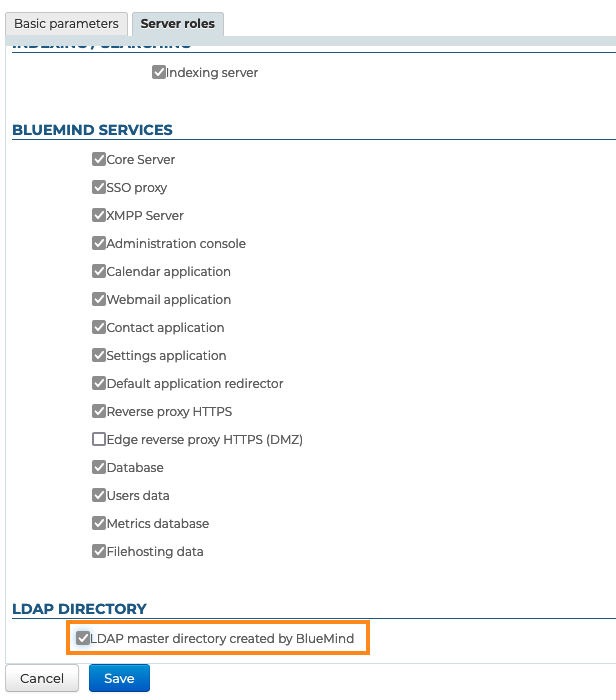
- select the server and go to the "Server roles" tab
- in the "LDAP Directory" section, check "LDAP master directory created by BlueMind":
-
Click "Save" to confirm
-
Then associate this server with the desired domain(s). To do this, go to the section Domain Management > Manage Domains and:
- select the domain you want to export in LDAP format
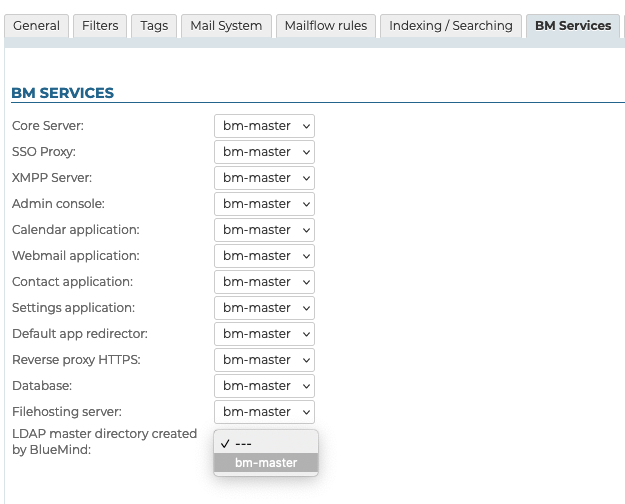
- go to the "BM Services" tab
- select the server for the service with the same name "LDAP master directory created by BlueMind":
- Click "Save" to confirm
Repeat this process for each domain as required.