Problems Accessing Mail Apps
BlueMind 4 introduces the new mail app (webmail) developed by BlueMind. This client is installed by default, but administrators retain control over which webmail client (classic or new) is enabled and used by users.
If users do not have access to one of the desired clients, or if they have access to an undesired client, follow the verification steps below.
Installing the New Mail Client
The new mail app (also known as mailApp) is installed by default with BlueMind; no installation is normally required. However, there may be cases where the packages are not present on the server (an older version, uninstallation for an outdated reason, etc.).
To give users access to the new mail app, install the following two packages:
- Debian/Ubuntu
- Redhat/CentOS
apt install bm-add-on-core-mailapp bm-mail-app
yum install bm-add-on-core-mailapp bm-mail-app
Then restart the bm-core service:
service bm-core restart
:::caution Service cutout
Warning, this feature temporarily cuts access to BlueMind and can disconnect users, who are likely to lose their work in progress. The service must therefore be restarted at a time that is not likely to have an impact on users.
:::
Enable and disable
Access to webmail is governed by roles; therefore, it is possible to grant users access to the classic webmail, the new webmail, or both—either on an individual basis or by group.
To find out more about managing these rights, go to the pages about Users and Groups :
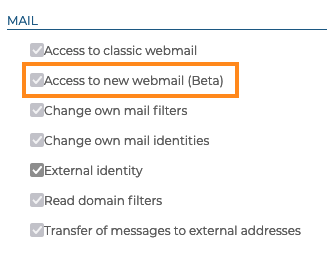
By enabling just one of the roles, the administrator can force the use of one or the other mail app. By enabling both roles, it gives the user a choice.
When you enable both, users will have a new button in their interface where they can switch from one to the other:

Users can also toggle from the Settings menu, under Mail :

:::tip Disabled by administrator
In case a user were unable to switch back to the classic webmail, you can disable it by disabling the role – when the user logs in again, they will be automatically redirected to the classic webmail application.
:::
Disable the old mail app
The "classic" webmail (based on RoundCube) cannot be uninstalled in the strict sense of the term. To prevent access, it is usually sufficient to disable the role assigned to users (see above). However, it is possible to prevent it from running by stopping the PHP service.
To do this, create an empty file named /etc/bm/bm-php.disabled and stop PHP:
touch /etc/bm/bm-php.disabled
systemctl stop bm-php-fpm
This way, PHP will no longer start—including when the server boots—and all users will be redirected to the new webmail, even if they do not have the appropriate role.