Setting up SSO CAS
This document describes how BlueMind recognizes CAS (Central Authentication Service) authentication.
How CAS authentication works
For initial authentication :
- The user tries to connect to BlueMind, which he opens in his browser.
- As it has not yet been authenticated, the BlueMind server redirects it to the CAS server for authentication.
- Once authenticated, a CAS cookie is placed in the user's browser, and the user is redirected to BlueMind with a ticket to validate.
- The BlueMind server :
- sees this ticket,
- asks the CAS server if it is valid,
- if this is the case, authorizes the connection and sets a cookie BlueMind in the browser.
On next authentication:
- The customer requests access to the BlueMind server again.
- As it has the BlueMind cookie, it is automatically authenticated as long as this cookie is valid.
For more information
- http://aldian.developpez.com/tutoriels/javaee/authentification-centralisee-sso-cas/images/09_diagramme_full.png
- http://www.jasig.org/cas/protocol
Installation
Install the needed package :
- Debian/Ubuntu
- Redhat/CentOS
aptitude install bm-plugin-hps-cas
yum install bm-plugin-hps-cas
Then restart BlueMind :
bmctl restart
Configuration
- Logged in as admin0, go to System management > System configuration > Authentication tab.
- Select the CAS authentication mode from the drop-down menu and fill in the associated fields:
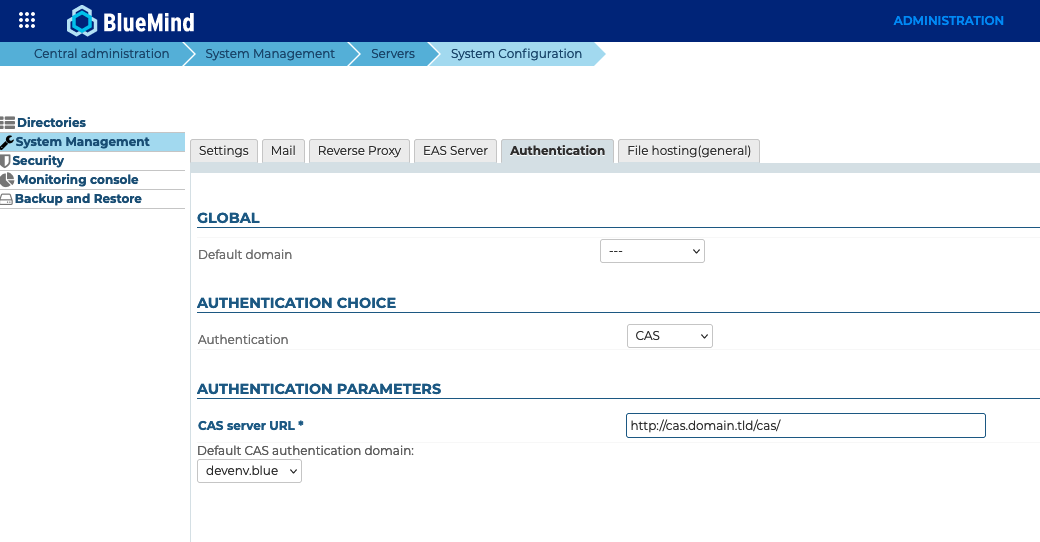
- CAS server URL
- Default BlueMind domain
- Click on "Save" to save your changes.
- Restart the bm-webserver service.
Users will then be automatically redirected to the CAS server when accessing the authentication page.
Known errors
Error 403: Your user account does not exist in this BlueMind.

Cause: This error message means that the login with which the user has authenticated to CAS does not exist for this domain. This can happen when the user has not yet been created in BlueMind, or voluntarily because you don't want the user to have access.
Solutions: Two solutions are possible:
- Create in BlueMind, in the right domain, the user associated with the CAS login.
- Ignore the error if access was refused voluntarily.
Error 500: Internal Server Error
There may be several reasons for this error message. To investigate and resolve the cause, consult the webserver logs.
Using a self-signed certificate or an unknown certification authority
Symptoms: If a self-signed certificate is used for the CAS server, or the CAS server's certification authority is not listed, a security error occurs when establishing the https connection to the CAS server.
Solution: To resolve this error, import the self-signed certificate or root CA into the jvm keystore used by BlueMind.
keytool -import -trustcacerts -alias cas -file cert_racine.crt -keystore /usr/lib/jvm/bm-jdk/lib/security/cacerts
Enter keystore password: changeit
For more information, see http://www.sslshopper.com/article-most-common-java-keytool-keystore-commands.html