Linked attachments
BlueMind lets users remove email attachments and show them as download links to recipients. This reduces the size of messages which lightens the load on servers and communications networks: the file is no longer physically sent with the email message and stored on the incoming network in addition to the outgoing network and thereby duplicated and multiplied as messages are forwarded and replied to.
File storage
Location
Files are stored on the BlueMind server itself, in the directory /var/spool/bm-filehosting/<domain>/; they are placed by user in subfolders of the form: /var/spool/bm-filehosting/<domain>/<first letter of UID>/<UID>/Attachments/
Users migrated from BlueMind 3.0 have a folder in the form /u/user_entity_XXX.
Users created in 3.5, 4.x and 5.x have a folder in the form f/F149E21D-596B-49CF-AECC-AC354139A06B.
Quotas and disk space
Stored files are not counted towards user quotas, which only concern emails, regardless of whether the Drive functionality (ability to retrieve files later) is activated or not.
Therefore, depending on the usage and the number of users in the installation, this space can grow significantly. To prevent server disk space saturation, it is therefore recommended creating a mount point for externalizing storage and to set up monitoring for it.
File hosting service
With the default installation, files are hosted on the BlueMind server itself (see above). A connection to Nextcloud or Alfresco is also possible.
Thanks to its API, BlueMind is able to interconnect with any other solution (Dropbox, ownCloud, etc.), so don't hesitate to contact us to discuss an implementation to suit your infrastructure.
Implementation
Installation
Packages are installed by default via .bin
In the case of manual installation via apt install bm-full, the following packages must be added:
apt install \
bm-plugin-admin-console-filehosting-settings \
bm-plugin-core-filehosting-filesystem \
bm-plugin-webserver-filehosting \
bm-chooser
# this package is required for the Thunderbird connector.
Then restart BlueMind.
Implementation takes place in 3 stages:
- Define storage server
- Activate service for domain(s)
- Connecting user accounts
Defining the file hosting server
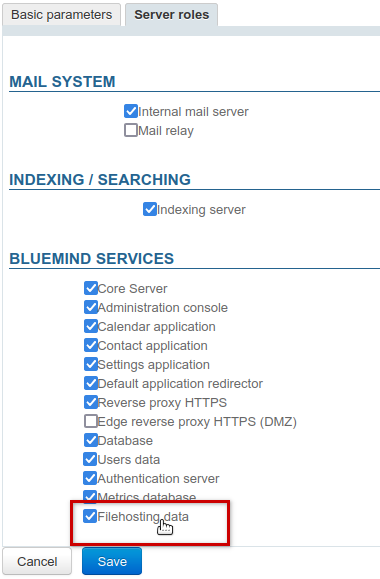
To activate the service, you must first tell BlueMind which server is to be used to store the detached files by assigning the "Filehosting File" role to the desired server, even in the case of a single-server architecture. To do this:
- log in as admin0
- go to System Management > Application Servers > [select server] > tab Server Roles
- in the "BlueMind Services" section, check the "Filehosting data" box:
Enabling the service for the domain
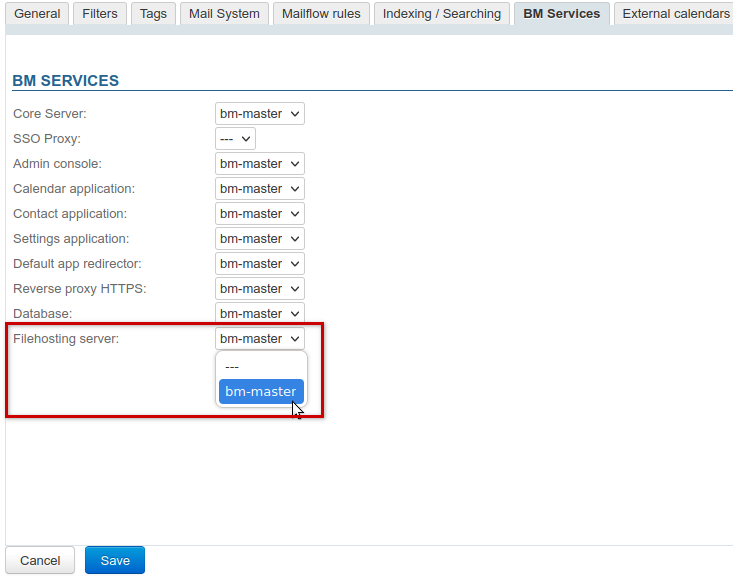
Once the server has been defined, the service must be enabled for the desired domain(s).
To do this, go to System Management > Supervised Domains > select a domain > tab BM Services and designate via the drop-down list the server on which the role was previously activated:
Enabling the features for users
Once the server has been defined and the service has been activated on the domain, access is granted to users by assigning them the appropriate role ; in this way, the functionality can be activated for all users or just some, by name or via groups.
Two complementary roles are available for both groups and users:
- Linked attachments: allows users to Adding a linked attachment to email or calendar events
- Drive: accesses the BlueMind file chooser for Adding an attachment from Drive. Users can browse previously sent files and link them into new messages.
This saves disk space as the same file is not stored multiple times.
Coupled with a NextCloud or Alfresco installation, this right gives users access to their personal storage space on it.
theme.common.Pourinfo Managing external accounts.
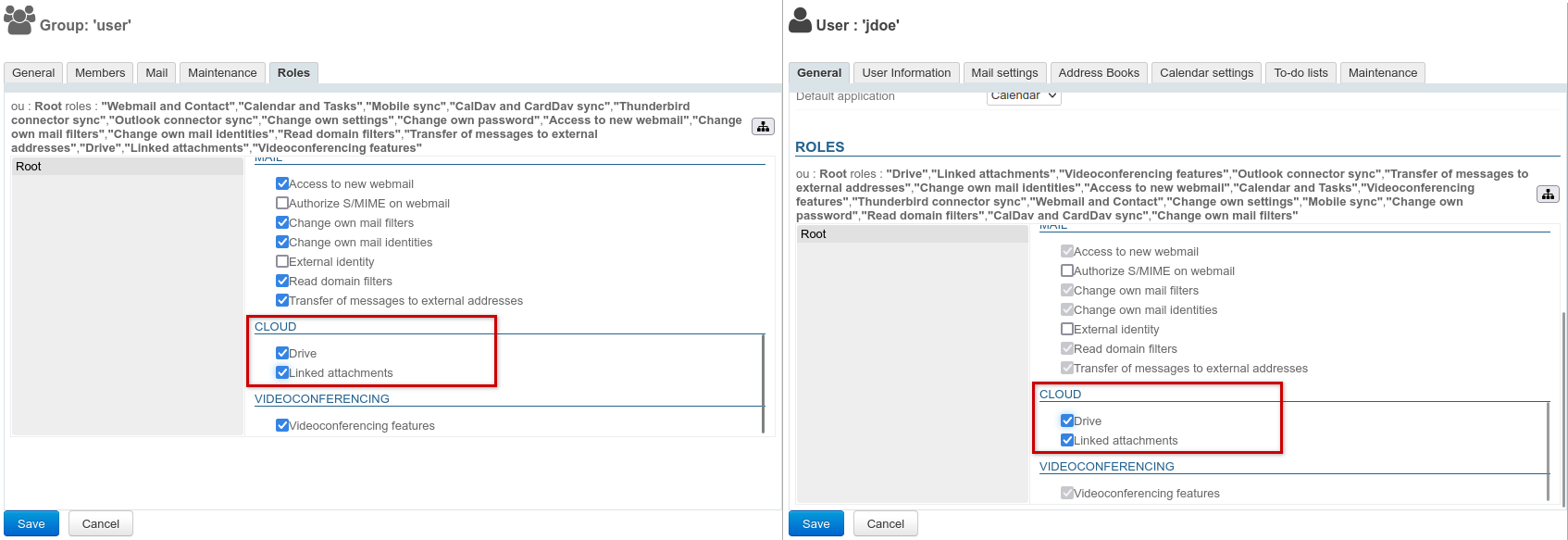
In the admin console, go to the entities' management section > Directory browser:
- Choose the group or user you want to assign a role to.
- Go to the roles' management section:
- For a group, in the ‘Roles’ tab
- For a user, in the ‘Roles’ section at the bottom of the ‘General’ tab
- In the "CLOUD" section, check the desired function(s):
Once the roles have been assigned, users are offered the option of detaching attachments:
- in the mail (see Adding a linked attachment)
- in calendar events
Adding or removing a role requires the users concerned to log in again before it takes effect.
Configuration
3 parameters can be specified globally or per domain:
- Retention period: number of days files are kept on the server
- Auto detachment limit (MiB1): any file equal to or larger than this threshold will be automatically detached
- Maximum linked attachment size (MiB1): maximum accepted size for a file
Global configuration
Go to System management > System configuration > Filehosting tab: this tab defines default values for newly created domains, as well as for domains whose configuration is not specified (see below)
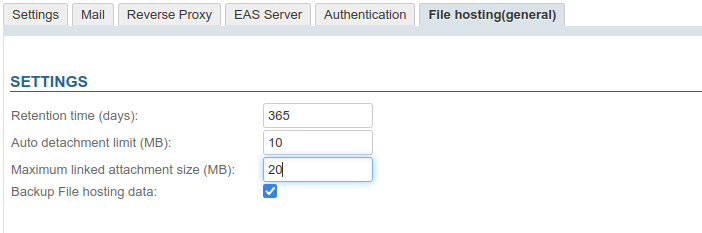
Extra options:
- Backup filehosting data: include user-detached files in the system backup
Configuration by domain
Go to System Management > Supervised Domains > choose a domain > tab Filehosting: this tab allows specifying values for the relevant domain:

File backup cannot be activated or deactivated on a per-domain basis, but only at the global configuration level (see previous paragraph).