Single-user restoration - DataProtect Navigator
Single-user restoration is the feature that allows you to restore an entity's data quickly. BlueMind's DataProtect browser lets you navigate easily and graphically through backup data from the administration console.
Restoration is therefore carried out via a graphical interface that lets you choose the type of entity (user, domain calendar, shared mailbox, etc.) and then the data to be restored (complete entity, mail, contacts, calendar only, etc.).
Restore entity data
To restore data :
-
As an administrator, go to the administration console > Backup and Restore > DataProtect Navigation:

→ The page displays the backups performed by BlueMind that are currently accessible.💡 Number of backups present
The number depends on the daily retention policy defined in the Backup configuration.ℹ️ Taille du sds-spool
La taille indiquée est celle de la version de la sauvegarde et non de la totalité du sds-spool. As the backup is differential, only new e-mails are counted. -
Click on the link of the desired backup.
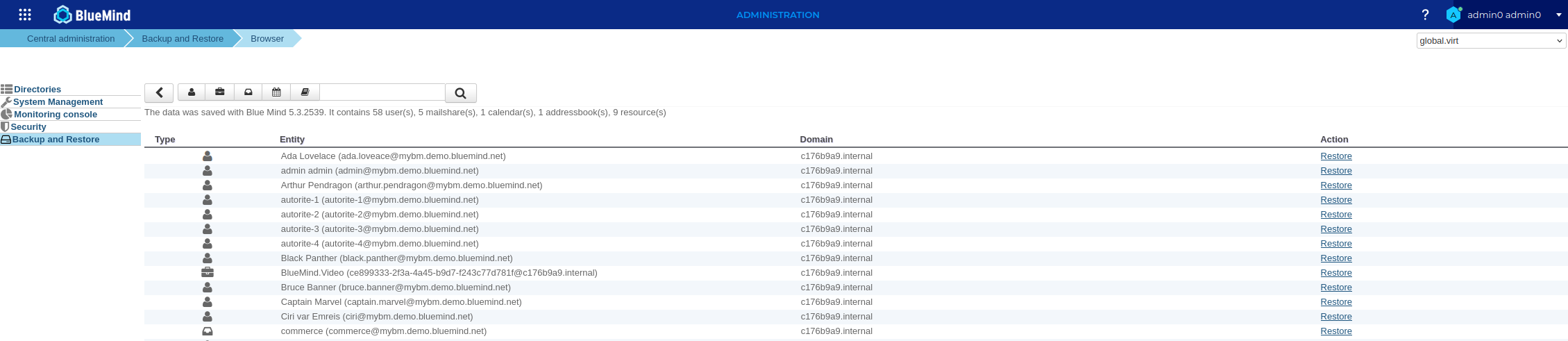
The system searches for available entities in the selected backup. The browser then presents the data contained in the entity backup:
-
Search for the desired entity in the list
💡 Filter entities
-
To filter by domain, use the drop-down list at the top right of the page:
(global.virtcovers all domains)

-
To filter by entity type, use the search tools above the list :

- Buttons show and hide corresponding entities
- Search box for text searches
- The
 button returns you to the DataProtect navigation home page.
-
-
Click on the "Restore" link corresponding to the selected entity (here a user).
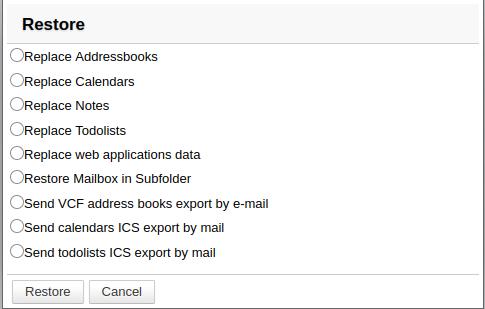
A popup window then shows the available restoration options. These vary according to the nature of the entity and its status, for example for a user :-
if the user present in the backup still exists:
-
if the user present in the backup no longer exists OR has been recreated with the same login:
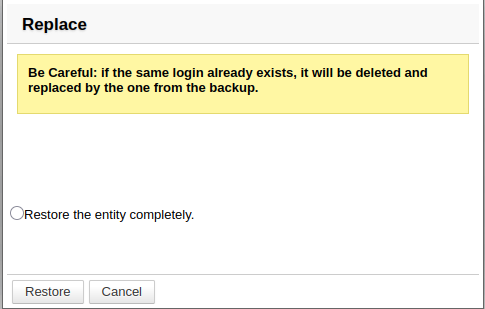
⚠️ Entity replacement
The entity that was previously deleted or recreated will be completely replaced by the one from the backup.
This behaviour will apply to the following entities with the same login: resources, users, shared mailboxes
This behaviour will apply to the following entities with the same name: domain address book, domain calendars
-
-
Check the desired option and click on " Restore ".
The popup shows the progress of the operation via a progress bar. The progress logs can be shown or hidden using the dedicated button.
Available options
Which data is available and how to restore it depends on the type of entity.
User
- Send ICS calendar exports by e-mail: Export user calendars in ICS format and send them by e-mail to the user's mail address.
- Send ICS exports of to-do lists by e-mail: Exports the user's to-do lists in ICS format and sends them by e-mail to the user's mail address.
- Send VCF address book export by e-mail: exports the user's address books in VCard format and sends them by e-mail to the user's mail address.
- ⚠️ Replace calendars: restores all calendars to the date of backup.
- ⚠️ Replace address books: restores all the user's address books.
- ⚠️ Replace web application data: restores settings for mail, contacts and calendar web applications.
- ⚠️ Replace to-do lists: restores the user's entire to-do lists (lists and contents).
- ⚠️ Replace notes: restores notes saved in Outlook.
- Restore mailbox to subfolder: restores the user's entire mailbox by creating a subfolder of it. The data currently present (files and emails) is thus retained.
⚠️ : During replacement operations, all changes made since then will be lost (new events or contacts, modifications, deletions, moves, etc.).
Shared mailbox
There is only one option here:
- Restore mailbox to subfolder: restores the shared mailbox's entire mailbox to a subfolder within the shared mailbox.
Resource
- Send an ICS export of the resource calendar by email: Exports the resource calendar in ICS format and sends it by email to users designated as managers (those with edit-level sharing rights)
- Replace resource: Restores all resource data (configuration, calendar, etc.).
Domain calendar
- Send an ICS export of the domain calendar by email: Exports the calendar in ICS format and sends it by email to designated users with ‘edit’ sharing rights
- Replace domain calendar: Restores all calendar data (configuration, events, etc.).
Domain address book
- Send a vCard export of the domain address book by email: Exports the address book in vCard format and sends it by email to users with sharing rights
- Replace domain address book: Restores all address book data (shares, contents, etc.).
Post-backup script
After each backup, DataProtect searches for and executes a script named /usr/bin/bm-post-full-backup.sh on the backed-up server. This script can be used to perform post-processing tasks, such as copying saved data to another location.