Setting up SSO CAS
This document describes how BlueMind recognizes CAS (Central Authentication Service) authentication.
How CAS authentication works
For initial authentication :
- The user tries to connect to BlueMind, which he opens in his browser.
- As it has not yet been authenticated, the BlueMind server redirects it to the CAS server for authentication.
- Once authenticated, a CAS cookie is placed in the user's browser, and the user is redirected to BlueMind with a ticket to validate.
- The BlueMind server :
- sees this ticket,
- asks the CAS server if it is valid,
- If that is the case, authorize the connection and set a BlueMind cookie in the browser.
On next authentication:
- The customer requests access to the BlueMind server again.
- As it has the BlueMind cookie, it is automatically authenticated as long as this cookie is valid.
For more information
- http://aldian.developpez.com/tutoriels/javaee/authentification-centralisee-sso-cas/images/09_diagramme_full.png
- http://www.jasig.org/cas/protocol
Prerequisites
Have a CAS server that is operational and accessible via HTTPS from the BlueMind server.
Installing
No installation is required; BlueMind natively supports authentication via a CAS server.
CAS configuration for a single or primary domain
-
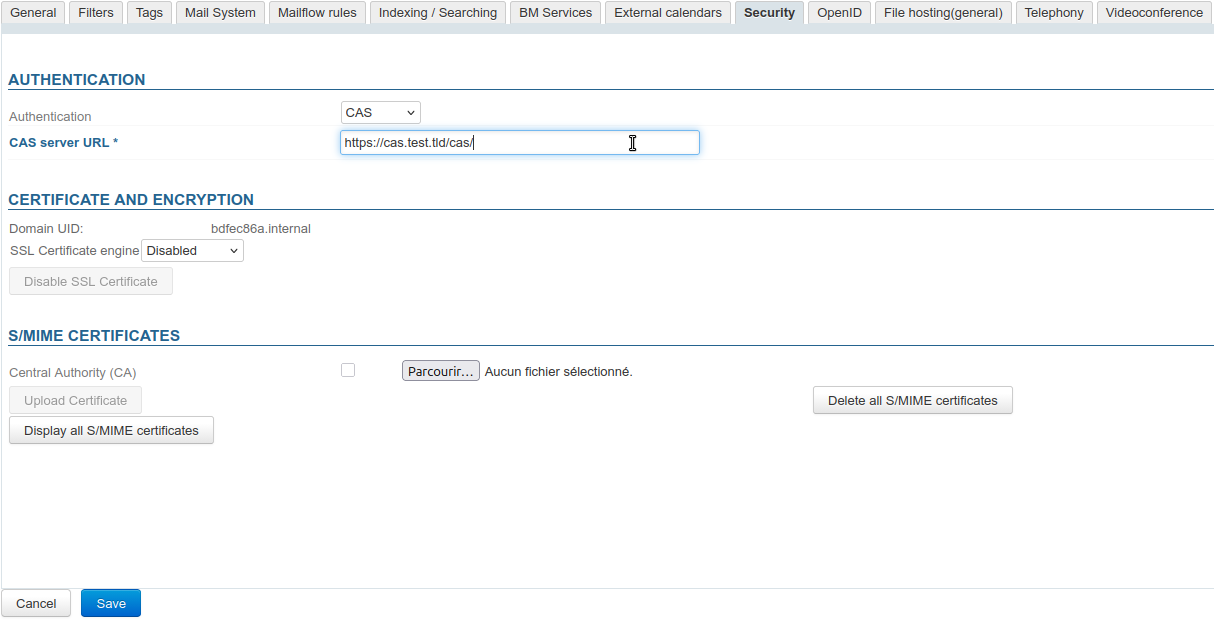
In the administration console, go to System management > Supervised domains > choose domain > Security tab.
ℹ️ Administrator account
As this procedure relates to domain configuration, it is possible and preferable to use a domain administrator account (see Organizational Units and Delegated Administration) rather than the superuser admin0. -
Select the CAS authentication mode from the drop-down menu and enter the CAS server URL:
-
Click on "Save" to save your changes.
Users will then be automatically redirected to the CAS server when accessing the authentication page.
CAS Configuration in a Shared Environment
To use a single authentication server with multiple domains, you configure the server for a primary domain, to which the other domains are linked.
From the web Domain management:
-
Set up your first domain using the method described above; it will then be considered the primary domain.
-
Enter an external URL for the primary domain (see External URLs).
Configuring the external URL is required for authentication to work properly with all domains. -
Note the identifier of the secondary domain(s) (domain UID, or Domain UID) from the list of domains or their management details.
-
Go to the management page for the primary domain > Security tab: below the CAS configuration form, an "Add" link now appears:
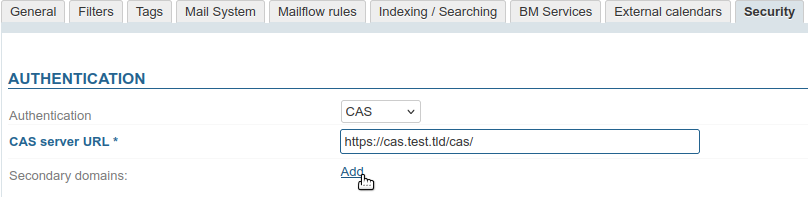
→ Click to add as many secondary domains as you like. -
In the fields provided, enter the UIDs of the domains you want to link:

-
Click "Save" to confirm.
-
In the subdomain management page, under the Security tab, the form has been replaced with a field displaying the primary domain's UID:

Known errors
Error 500: Internal Server Error
There may be several reasons for this error message. To investigate the cause and find out how to solve it, consult the webserver logs.
Using a self-signed certificate or an unknown certification authority
Symptoms: If a self-signed certificate is used for the CAS server, or the CAS server's certification authority is not listed, a security error occurs when establishing the https connection to the CAS server.
Solution: To resolve this error, import the self-signed certificate or root CA into the jvm keystore used by BlueMind.
keytool -import -trustcacerts -alias cas -file cert_racine.crt -keystore /usr/lib/jvm/bm-jdk/lib/security/cacerts
Enter keystore password: changeit
For more information, see http://www.sslshopper.com/article-most-common-java-keytool-keystore-commands.html