Hardware Sizing
The figures given here are for guidance only. Indeed, even for the same number of users, usage can vary greatly depending on organisational structures and habits. The number of emails, their size, the number of recipients in each email, the number of appointments, scheduling tasks… all of these vary greatly on a daily basis.
The vCPU and/or RAM resources indicated below are understood to be dedicated to virtual machines. In other words, these resources must be excluded from any sharing with other virtual machines.
In fact, particular care must be taken not to place BlueMind instances in a context where the hypervisor(s) is (are) in overcommit status.
About units
A BlueMind system is made up of multiple components that use up resources.
A basic ‘per-user’ calculation is not valid, as a user who only uses the mail app will not place the same demands on the system as a user who uses both mail app AND collaborative tools (calendar, etc.), nor as a user using MAPI or a mobile device.
Two factors come into play in this calculation:
- Usage: The more features a user enables (collaboration, MAPI), the more they tax the system;
- Storage associated with this use case: For the same use case, a higher quota means more data to index, back up, and serve, and therefore acts as a multiplier on the cost per unit.
The sizing calculation is therefore performed on a per-unit basis, given that:
| User profile | Storage / quota | Cost per Unit |
|---|---|---|
| Mail only | 2 GB | 1 |
| Mail + intensive collaboration | 4 GB | 2 |
| Mail + collaborative + mapi | 10 GB | 5 |
| Mail + collaborative + mapi | 50 GB | 25 |
The last two rows illustrate the impact of storage: for the same usage (mail app + collaboration + MAPI), a fivefold increase in the quota results in a fivefold increase in the cost in units.
Similarly, for the same number of units, a system used solely for mail apps will not consume resources in the same way as one used for both mail apps and collaboration (for half the number of users). Email, for example, is more dependent on I/O than on the CPU, whereas collaboration tools are generally the opposite.
CPU
Values are assessed and expressed in terms of the number of cores.
The benchmark used for the calculations below is 1 Zen 4 core from an AMD EPYC 9654 (Genoa, 5 nm, released in late 2022).
The selected CPU must be supported by its manufacturer for the entire duration of the messaging contract: for a 5-year contract, prioritise a CPU for which the manufacturer’s support covers the entire period. An additional criterion to consider is the performance-per-watt ratio, which clearly favours recent architectures (≤ 5 nm) over earlier 14/10 nm generations.
Equivalences Between CPU Generations
The table Number of cores per unit below is expressed in Zen 4 9654 equivalent vCPUs.
As a guide, here is how many vCPUs from other platforms are required to match 8 reference vCPUs, calculated based on the Geekbench 6 single-core score (a reasonable proxy for performance per core):
| Platform | Geekbench 6 Single-Core | Ratio vs. 9654 | Equivalent to 8 reference vCPUs | Related power budget |
|---|---|---|---|---|
| Intel Xeon Platinum 8280 — Cascade Lake, 14 nm (2019) | ~1214 | 0,65 | ~12 vCPUs | ~88 W |
| AMD EPYC 9654 — Zen 4, 5 nm (2022) — part number | ~1859 | 1,00 | 8 vCPUs | ~30 W |
| Intel Xeon Gold 6542Y — Emerald Rapids, Intel 7/10 nm (2023) | ~2263 | 1,22 | ~7 vCPUs | ~73 W |
| AMD EPYC 9755 — Zen 5 "Turin", 3–4 nm (2024) | ~2413 | 1,30 | ~6 vCPUs | ~23 W |
Scores recorded on Geekbench Browser. Wattage budget = (socket TDP / number of cores) × equivalent vCPUs, at full load (8280: 205 W / 28 c; 9654: 360 W / 96 c; 6542Y: 250 W / 24 c; 9755: 500 W / 128 c). These ratios are indicative: actual performance also depends on memory bandwidth, cache, the platform and the workload — a benchmark under the target workload is still preferable for precise sizing.
In a virtualisation cluster, hypervisors generally expose the capabilities of the cluster’s lowest-performing CPU to virtual machines, in order to allow VMs to be moved between nodes. BlueMind utilises the modern features of CPUs based on the capabilities actually exposed to virtual machines; therefore, a recent CPU exposed with an outdated profile will not deliver its true performance.
Instruction sets
Beyond the number of cores and their clock speeds, BlueMind utilises several hardware instruction sets. These are visible in the flags of /proc/cpuinfo (or, on a VM, in those actually exposed by the hypervisor — see the box above):
aes: hardware acceleration for AES encryption, widely used on all SSL/TLS connections (IMAPS, HTTPS, SMTP STARTTLS, inter-server replication).sha_ni: Intel/AMD SHA instructions that accelerate hash calculations (integrity checks, digital signatures, storage-side hashing, and authentication).avx,avx2(SIMD): used in particular for Base64 decoding when reading email attachments, an operation that occurs constantly whenever a user checks their emails.
⚠️ A recent CPU deployed in a VM with an outdated profile (for example, a Nehalem or Westmere profile on a heterogeneous cluster) may mask some or all of these flags and significantly degrade perceived performance, even though the physical hardware is identical.
Number of cores per unit
BlueMind includes many services, so we recommend 2 cores minimum.
Please note that allocating too much CPU capacity can lead to other problems in virtualised environments.
| Units | Number of cores |
|---|---|
| 1-200 | 2 |
| 200-1000 | 4 |
| 1000-2000 | 6 |
| 2000-3000 | 8 |
| 3000-6000 | 12 |
| 6000+ | 2 / 1,000 units |
RAM
We recommend 24 GB RAM minimum.
| Units | RAM |
|---|---|
| 1-1000 | 24 GB |
| 1000-2500 | 32 GB |
| 2500 - 5000 | 48 GB |
| 5000-10000 | 64 GB* |
| 10000+ | 96 GB* |
* with relocation of the bm-elasticsearch service to a dedicated server
bm-elasticsearch?Running Elasticsearch on its own VM addresses several concerns:
- VM size compatible with the hypervisor and its settings.
Certain hypervisor features impose a cap on the number of vCPUs per VM. For example, VMware Fault Tolerance is capped at 8 vCPUs per protected VM (Broadcom documentation) → Offloading ES allows the main VM and the ES VM to remain below these thresholds. - Staying within a NUMA node.
Beyond a certain size, a VM no longer fits within a NUMA node, and CPU/memory scheduling becomes less efficient. The granularity depends on the physical CPU: for example, a 96-core processor can be organized into groups of up to 24 cores per NUMA node, which limits the effective size of a single-socket VM. - Segment resources between Elasticsearch and the rest of BlueMind.
With a dedicated VM, the ES heap, its file cache and its indexing I/O no longer interfere with those of the BlueMind core or PostgreSQL → Intensive indexing no longer slows down SQL queries or access to/var/spool/cyrus/data. - Migrate to another hypervisor.
Moving the ES VM to a different host (and ideally to different network cards) frees up resources on the primary host and helps distribute the load across the virtualization pool.
The downside: one or more additional VMs for ES introduce complexity and a little overhead — a new kernel to maintain, a new BlueMind node to declare, new monitoring agents, and, when the ES VM runs on a different hypervisor, traffic must traverse the physical network for every indexing or search request. Where these constraints do not apply, a single, appropriately sized VM may suffice.
Storage / IO Performance
Disc type
The quality and speed of disks are key factors for a high-performance mail app: a mail app places heavy demands on disks, not only for reading and writing small files, but also for all email processing tasks (indexing, read status, etc.).
The use of SSD/NVMe drives is mandatory for a new installation and strongly recommended when upgrading from version 4, unless the existing hardware is fully satisfactory. Mechanical/rotational drives have high latencies that are incompatible with the system’s requirements. They may, however, be used for backups or in a storage hierarchy, behind high-performance SSDs/NVMe drives.
Storage Virtualization
Virtualised or distributed storage systems (Ceph, vSAN, iSCSI or NVMe-oF SANs, NFS on remote storage, etc.) introduce several layers between the BlueMind VM and the physical disks. Each of these layers results in additional latency, the impact of which is all the greater when the I/O operations are small and numerous.
BlueMind therefore recommends paying particular attention to the following points:
- Latency: requirements vary depending on the volume:
- For
/var/lib/postgresql, aim for < 1 ms for synchronous writes; beyond a few milliseconds, the performance of the entire mail app is degraded. - For
/var/spool/cyrus/dataand other I/O volumes, keep I/O operations below 10 ms.
- For
- Block size: on BlueMind installations, it is generally observed that 80 per cent of emails are smaller than 128 KB and 95 per cent smaller than 1 MB. Oversized block sizes (4 MB blocks on the Ceph side,
DiskMaxIOSize1 MB blocks on the VMware side, etc.) unnecessarily amplify each I/O operation and degrade performance, particularly for the PostgreSQL database, which operates on 8 KB pages. - Nominal and observed performance: the advertised IOPS do not necessarily reflect those actually available to the VM once the cache is saturated or when other workloads are present on the cluster.
- Cluster events: Rebuild and rebalance operations on the Ceph or vSAN side may temporarily degrade performance as seen by the VM.
- Segregation of network traffic: the network used to access storage must be separated from user traffic.
For example, downloading a large attachment via Outlook should not affect the performance of SQL queries or writes to the email volume → Dedicate separate interfaces and/or VLANs to storage.
Local latency alternative: A hypervisor such as Proxmox, combined with ZFS on local NVMe drives, offers the latency of a directly attached drive while maintaining snapshots, asynchronous replication, and data integrity. This is a suitable approach when I/O performance takes precedence over the hot mobility of VMs.
Restoring the BlueMind instance to a previous hypervisor or ZFS snapshot has implications for clients that have already been configured:
- MAPI clients (Outlook): Client and server statuses become out of sync, with a risk of duplicates, missing items, or a complete resynchronization of the mailbox.
- Mobile apps / mail app: Object usernames (UIDs, sync keys) are tracked over time, allowing clients to replay or skip changes.
To roll back, you should therefore prioritise a restore via DataProtect rather than a snapshot.
Snapshots, however, remain a suitable safety net during an upgrade, provided two conditions are met:
- The user session is terminated upstream of BlueMind before the snapshot is taken (no active MAPI, mobile or webmail clients during the window)
- Snapshots are atomic across all VMs comprising the infrastructure, to ensure consistent return across services
Minimum disk performance
Storage is sized based on two factors: IOPS1 s and latency.
For example, a drive such as the Samsung PM1733 NVMe SSD (2022) perfectly meets these requirements when connected directly.
As soon as that same drive is hidden behind a network storage layer (Ceph, vSAN, iSCSI SAN or NVMe-oF, etc.), the latency introduced by the layer and the configuration of these components for mail app use make all the difference (see the section on Storage virtualisation).
BlueMind has therefore added a dedicated I/O buffer, mounted at /var/mmap-pool (see the corresponding row in the mount points table below).
ℹ️ Operation: This buffer keeps as much data as possible in memory, and when writing to disk becomes necessary, it groups operations into large blocks that are more easily handled by the underlying layers. This makes the system more resilient than an IO-naive service when dealing with virtualised or network-based storage (vSAN, Ceph, NFS, iSCSI SAN or NVMe-oF).
Storage space, on the other hand, depends directly on customer demand (quotas, etc.).
Depending on the end use, not all drives necessarily need to have the same level of performance or the same capacity.
The minimum volumes given below are estimates and may vary according to the installation and the evolution of the organization. It is therefore preferable to use technologies that allow simple expansion of FS (LVM, etc.).
Mount points
Mounting point | Description | NFS type | Object Storage S3/Scality Ring type | Minimum volume |
|---|---|---|---|---|
/tmp | Temporary files | ❌ | ❌ | 1.2 GB for the BlueMind installation. This is due to the unpacking of the installer. |
/usr | ❌ | ❌ | 8 GB to accommodate web modules and applications. | |
/var/backups/bluemind | DataProtect backups | ✅ | ❌ | Sum of: |
/var/lib/alloy | Metrics collection and reporting for monitoring | ❌ | ❌ | 3 GB on each server in the installation |
/var/lib/mimir | Mimir/Promotheus database (monitoring metrics) | ❌ | ❌ | 10 GB on the server tagged with bm/monitoring |
/var/lib/postgresql | PostgreSQL database | ❌ | ❌ | 5% of the volume of |
/var/lib/valkey | Valkey/Redis database (internal cache, replaces | ❌ | ❌ | At least 2 GB, to be adjusted based on the number of concurrent sessions and the size of the directory (including photos and S/MIME certificates). |
/var/log | System and application logs | ❌ | ❌ | 50 GB |
/var/mmap-pool | BlueMind I/O buffer: space is reserved on the disk, but actual writes are only triggered depending on the system’s memory pressure (see above). | ❌ | ❌ | 20 GB |
/var/spool/bm-docs | Storage of user thumbnails, resources... | ❌ | ❌ | 1 MB per entity with label |
/var/spool/bm-elasticsearch | Elasticsearch index data | ❌ | ❌ | 10% of the volume of |
/var/spool/bm-mail | Sending emails via EAS/MAPI | ❌ | ❌ | 2 GB |
/var/spool/bm-mapi | Temporary folders for the bm-mapi service | ❌ | ❌ | 2 GB |
/var/spool/cyrus/data | Email storage space | ❌ | ✅ | Largest storage space, to be determined based on the expected volume of email. |
/var/spool/bm-hsm | Inherited from v4: secondary storage space for emails (see Hierarchical storage (HSM)); this remains in place to ensure compatibility during v4 → v5 migrations. | ⚠️ | ❌ | |
/var/spool/postfix | Email queue | ❌ | ❌ | 2 GB |
/var/spool/cyrus/data?Version 4 of BlueMind relied on Cyrus-IMAPD as its IMAP storage engine. From version 5 onwards, Cyrus is replaced by an in-house solution: the IMAP protocol continues to be supported as an access method alongside ActiveSync, MAPI and CalDAV, but it is no longer the component that stores the emails.
To facilitate migration from v4 and to align with the storage allocations already in place for our customers, emails continue to be stored (excluding object storage) at /var/spool/cyrus/data.
Prioritize object storage to achieve better results than NFS setups, especially if the block storage being used is network-based (e.g., Ceph, iSCSI SAN, or NVMe-oF).
Object storage
Emails can be stored on an S3-compatible object storage system (or native Scality Ring). This is the preferred option in order to reduce the load on the PostgreSQL server and delegate storage prioritisation (RAM / NVMe / mechanical disks) to the object storage layer rather than to the built-in HSM.
The most commonly deployed systems with BlueMind are:
| System | Ways to access | Typical scenario |
|---|---|---|
| Ceph | S3 (RadosGW) | On-premises, internal clusters |
| Scality Ring | Native Ring (sproxyd) or S3 | On-premises, high volumes |
| Scality Artesca | S3 | Pre-production |
| Outscale Object Storage | S3 | Sovereign cloud |
| MinIO | S3 | On-premises |
| SeaweedFS | S3 | On-premises |
Each of these systems comes with its own constraints (consistency, minimum block size, latency, storage class management, TLS integration, key management, scalability, behaviour during rebalancing, etc.) and the same backend cannot be configured in the same way depending on what it is required to store: a cluster configured to stream videos of several GB is not necessarily the most suitable for an email bucket, where the majority of objects are less than 1 MB.
The choice of backend and its configuration must therefore be finalised before the architecture is locked in.
Bandwidth
The required bandwidth is not easily predictable: it depends largely on email traffic, which itself varies greatly depending on usage and events (newsletters, mass communications, etc.). The information below is intended to provide orders of magnitude and a framework for analysis rather than prescriptive values.
Example from a real-world installation
The graph below shows the external network traffic observed on a BlueMind SaaS installation over the course of a week.
As all users are external to the infrastructure, their traffic therefore passes via the internet.
Internal network traffic is not counted.
Spam traffic is also blocked upstream by dedicated equipment and therefore does not appear in the incoming traffic measured here.
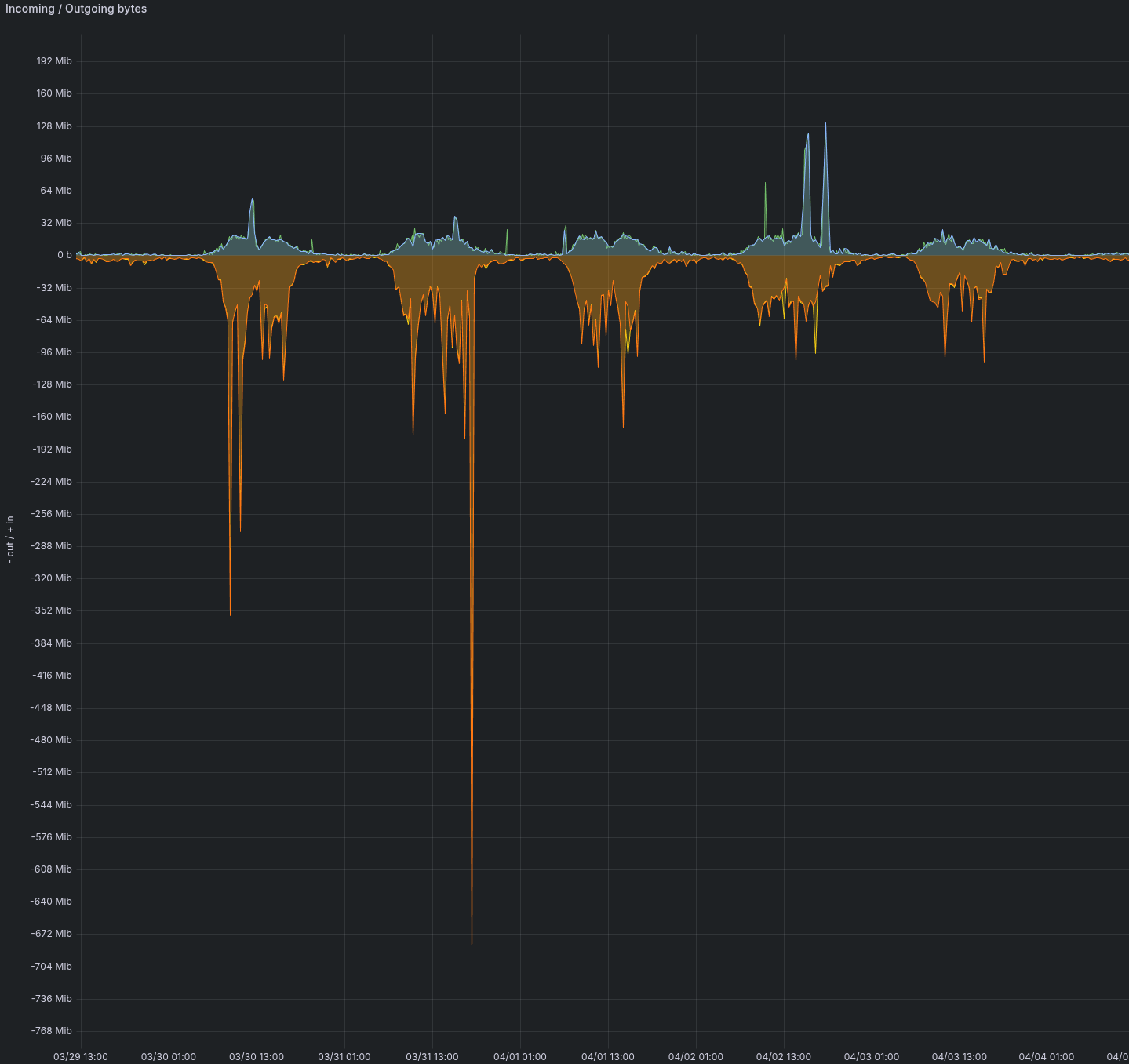 Inbound/outbound traffic over a week, expressed in MiB2
Specifications of the installation under consideration:
- 10,000 users of the mail app only
- 2,000 advanced collaborative users
- > 2,000 smartphones connected via EAS
- Email client mix: 70% MailApp, 30% Thunderbird
Key takeaways:
- Marked asymmetry: outbound traffic (server → clients) is significantly higher than inbound traffic.
This is because users download more than they upload (receiving emails, downloading attachments, etc.). These are typical usage patterns. - Day/night cycle: activity drops to almost zero at night and at weekends, then rises sharply in the morning.
This is also a typical use case: users log back in in the morning within a limited time window and work throughout the day. - Peak output data transfer rates of several hundred MiB2/s.
This is typical of mass mailings: a message is sent to all users. - Daily data volume of several tens of MiB2/s output.
This represents typical mail app activity during working hours.
Best practices
Design for peak load
A system must be sized for its peak load, not for steady-state operation or average load.
As shown in the example above, an enterprise mail app exhibits characteristic peaks that must be taken into account:
- Morning logins: the majority of users log in during the same time slot at the start of the day, triggering the synchronisation of all emails received since the previous day.
💡 Also bear in mind newsletters and other communications sent to all staff, which therefore arrive simultaneously in everyone’s inboxes.
- Big Bang migration: during a switchover, all servers are synchronised on the same day. However, even with a user base consisting solely of webmail users, differential synchronisations must be initiated: the email folder lists from the various folders are retrieved, even if the content is not downloaded at this stage.
Planning Email Storage Capacity
The daily volume of incoming emails must be known and built into disk sizing, regardless of user quotas.
Retention mechanisms (double-bottom trash can, backups, archiving) retain a copy of emails beyond their completion on the user side.
For example, for 20 GB of incoming emails per day and 30 days of dual-replica retention, a minimum of 600 GB must be allocated to handle this traffic, even if these emails are read and deleted by their recipients within the same day.
Set a maximum email size
As a reminder, on BlueMind installations, 80 per cent of emails are under 128 KB and 95 per cent are under 1 MB.
The maximum size configured for emails is used by the system as an indicator to pre-reserve disk space: the SMTP protocol transmits data without announcing its size in advance, so BlueMind must size its receive buffer to the maximum permitted value (simplified explanation; the actual mechanism is more subtle, involving a dedicated mmap-pool and optimisations depending on memory pressure).
Furthermore, third parties with whom users correspond will generally not accept emails of 100 MB. BlueMind therefore offers the option to detach attachments and integrate with Nextcloud to share large files (see the section File hosting).
Recommendation: avoid allowing more than 30 to 35 MB per email. Above this limit, emails may pile up in outboxes and lead to confusion amongst users (for example, internal recipients receive them, whilst external users do not).
Example of sizing
This section details the application of the above rules to four specific architectures. The figures are indicative and intended to be recalibrated based on real-world observations: they serve as a basis for discussion rather than as prescriptive guidelines.
The tables on this page provide sizing calculations based on peak load (see above). This is the theoretical target sizing, which ensures a new installation is adequately provisioned without knowing its actual workload.
In practice, BlueMind can run very well on significantly less powerful configurations. Once the actual workload of a target installation has been assessed (actual data volume, usage mix, hourly distribution, client behaviour), many of the theoretical prerequisites can be relaxed without compromising the user experience.
Only a test carried out with our integrators can determine precisely where to apply these margins and by how much: this is the stage that transforms a theoretical specification into an operational specification optimised for the client’s specific context.
Assumptions made
Users
💡 Unit costs are based on the principle of units outlined earlier on this page.
For this example:
| Population in the example | Selected profile | Units |
|---|---|---|
| TB or MailApp user with a connected smartphone | Mail App + Intensive Collaboration (4 GB) | 2 |
| TB or MailApp user without a connected smartphone | Mail app (2 GB) | 1 |
| Full-featured collaborative Outlook user (MAPI 10 GB) | Mail app + collaboration + MAPI (10 GB) | 5 |
| Account with a large quota (top 2 per cent, 50 GB) | Mail app + collaboration + MAPI (50 GB) | 25 |
| Inactive accounts (service accounts, aliases, employees without computers, etc.) | ≈ 30% of a "mail app-only" plan | 0,3 |
Observed distribution of quotas
On existing installations, we find a fairly stable quota histogram:
- Approximately 2 per cent of mailboxes with an extended quota of 50 GB (senior management, archiving, communications, specific accounts)
- 10% quota, 10 GB (intensive collaboration, typically Outlook MAPI)
- the rest between 1 and 2 GB.
For the calculations below:
- The 10 GB cohort is explicitly represented by users with full Outlook collaboration in architectures B and C, and is absent by design in A (no MAPI deployed)
- The 50 GB cohort is added to each architecture as 2 per cent of the total number of servers: this is not insignificant in terms of units (× 25) or storage (× 50 GB), even when there is no large-scale MAPI deployment
The weighting of 0.3 units applied to low-activity machines isthe most uncertain assumption in this example: it reflects the idea that these machines are not permanently connected (functional machines, aliases, workstations without a dedicated workstation). This is generally the value that should be recalibrated first on a comparable installation.
Smartphones connected to BlueMind
Connecting one’s phone to the work mail app is a personal decision (work-provided phone, BYOD, right to disconnect). In the installations observed, it was noted that around 30 per cent of actual users (individual mailboxes, excluding shared mailboxes) connect their phones.
Architecture A — 20,000 workstations, Thunderbird + MailApp
This is a messaging-oriented organisation with light collaboration, without MAPI deployed.
The 10 GB cohort is absent; the 50 GB cohort (2 per cent) remains (archives, specific accounts).
Field data: on the reference installation, 2,300 out of 5,000 users have a smartphone connected to BlueMind (≈ 46 per cent); the remaining 2,700 access their mailboxes via webmail or an IMAP client only:
| Population | Headcount | Units/Profile | Total units |
|---|---|---|---|
| TB or MailApp user with a smartphone (4 GB) | 2 300 | 2 | 4 600 |
| TB or MailApp user without a smartphone (2 GB) | 2 700 | 1 | 2 700 |
| High-quota accounts (top 2%, 50 GB) | 400 | 25 | 10 000 |
| Low-activity accounts | 14 600 | 0,3 | 4 380 |
| Total | 20 000 | 21,680 units |
Application of the tables:
- CPU: over 6,000 units: 2 cores per 1,000 units ⇒ ~ 44 Zen 4 reference cores (~ 36 cores on a Xeon Gold 6542Y or ~ 34 cores on an EPYC 9755).
See: Equivalences between CPU generations - RAM: 10,000+ units ⇒ 96 GB per node, remote Elasticsearch required.
- Email volume (theoretical maximum at quota limits): 2,300 × 4 GB + 2,700 × 2 GB + 400 × 50 GB + 14,600 × 2 GB = ≈ 64 TB ⇒ allow for 19–32 TB of usable space, as the typical utilisation rate is usually between 30 and 50 per cent.
Note: In object storage, this volume resides in the bucket (see ‘Associated object storage’ below); in local storage, it would be located at/var/spool/cyrus/data. /var/lib/postgresql: ~5% of the email volume ⇒ 1.0–1.6 TB./var/spool/bm-elasticsearch: ~10% of the email volume ⇒ 1.9–3.2 TB.
Proposed VM partitioning (object-stored emails):
| VM / role | vCPU | RAM | Local storage |
|---|---|---|---|
| BlueMind Heart | 20 | 96 GB | 200 GB NVMe (OS, /var/log, /var/spool/bm-mail, /var/spool/bm-mapi, /tmp, caches) |
PostgreSQL (bj-data database) | 16 | 40 GB | 2.1 TB NVMe for /var/lib/postgresql (≈ 2 TB, OS / logs ≈ 0.1 TB — email blobs are in object) |
| Elasticsearch | 8 | 32 GB | 4 TB NVMe for /var/spool/bm-elasticsearch |
| Total | 44 | 168 GB | ≈ 6.3 TB |
Reference3
Related object storage:
| Volume / bucket | Estimated volume | Description |
|---|---|---|
| Email list | 19–32 TB | Email storage, accessed via S3 by BlueMind |
Architecture B — 8,000 mailboxes, Outlook MAPI server farm
A fully collaborative Outlook-based organization (10 GB quota), with additional functional mailboxes and the standard 50 GB quota.
| Population | Headcount | Units/Profile | Total units |
|---|---|---|---|
| Fully collaborative Outlook (MAPI) | 5 000 | 5 | 25 000 |
| High-quota accounts (top 2%, 50 GB) | 160 | 25 | 4 000 |
| Functional/service boxes | 2 840 | 0,3 | 852 |
| Total | 8 000 | 29,852 units |
Smartphones connected to BlueMind: 30 per cent of users (see above), i.e. ~1,550 smartphones on this architecture (≈ 1,240 EAS + 310 simple IMAP accounts).
Application of the tables:
- CPU: 29,852 units ⇒ ~60 reference Zen 4 cores (~49 on a Xeon Gold 6542Y, ~46 on an EPYC 9755).
- RAM: 10,000+ units ⇒ 96 GB per node, remote Elasticsearch required.
- Email volume (theoretical maximum based on quotas): 5,000 × 10 GB + 160 × 50 GB + 2,840 × 2 GB ≈ 64 TB max ⇒ 20–32 TB realistic.
In object storage, this volume resides in the bucket (see ‘Associated object storage’ below); in local storage, it would be located at/var/spool/cyrus/data. /var/lib/postgresql: ~5% of the email volume ⇒ 1.0–1.6 TB./var/spool/bm-elasticsearch: ~10% of the email volume ⇒ 2.0–3.2 TB.- DataProtect backup: email volume > 1 TB → disable DataProtect for emails at this volume and switch to a third-party backup strategy + double-bottom trash can.
Proposed VM partitioning (object-stored emails):
| VM / role | vCPU | RAM | Local storage |
|---|---|---|---|
| BlueMind Heart | 28 | 96 GB | 200 GB NVMe (OS, /var/log, /var/spool/bm-mail, /var/spool/bm-mapi, /tmp, caches) |
PostgreSQL (bj-data database) | 20 | 48 GB | 2.1 TB NVMe for /var/lib/postgresql (≈ 2 TB, OS / logs ≈ 0.1 TB — email blobs are in object) |
| Elasticsearch | 12 | 48 GB | 4 TB NVMe for /var/spool/bm-elasticsearch |
| Total | 60 | 192 GB | ≈ 6.3 TB |
Reference3
Related object storage:
| Volume / bucket | Estimated volume | Description |
|---|---|---|
| Email list | 20–32 TB | Email storage, accessed via S3 by BlueMind |
At 29,852 units (~60 Zen 4 cores), a single VM combining a core, PostgreSQL and Elasticsearch would far exceed the VM sizes recommended by hypervisors (typically ~8 vCPUs). The architecture must therefore separate the resource-intensive roles: a dedicated Elasticsearch server and a dedicated PostgreSQL server, which brings each VM down to a manageable size.
Where possible, placing ES and/or the PostgreSQL VM on separate hypervisors (and separate network interfaces) provides additional resilience in the event of a host failure.
The PostgreSQL server hosts the bj-data database, which contains most of the BlueMind tables related to mail apps.
With object storage, email blobs are stored in the bucket and the PostgreSQL VM becomes significantly lighter: it is in this context that separating it from the core is easiest to implement (the breakdown table above illustrates this: 16–20 vCPUs, 40–48 GB, ~2 TB of /var/lib/postgresql, and that’s it).
With local storage, however, we keep PostgreSQL and the email filesystem at /var/spool/cyrus/data on the same machine: moving PostgreSQL would mean that every email access would involve an additional network hop between the database and the blobs, at a performance cost that outweighs the benefits of a separate VM. At scale, this same machine then hosts both the database and the blobs and handles the majority of I/O; we allocate suitable hardware to it (fast NVMe, sustained I/O, RAM) rather than splitting the function.
C Architecture — 1,000 mailboxes, small Outlook MAPI environment
A small MAPI organisation, with a significant proportion of shared mailboxes, staff without dedicated workstations, and the usual 50 GB quota reduced to just a few accounts.
| Population | Headcount | Units/Profile | Total units |
|---|---|---|---|
| Fully collaborative Outlook (MAPI) | 500 | 5 | 2 500 |
| High-quota accounts (top 2%, 50 GB) | 20 | 25 | 500 |
| Shared mailboxes / non-screen staff | 480 | 0,3 | 144 |
| Total | 1 000 | 3,144 units |
Smartphones connected to BlueMind: 30 per cent of users (see above), i.e. ~155 smartphones (≈ 125 EAS + 30 simple IMAP).
Application of the tables:
- CPU: 3,000–6,000 units range ⇒ 12 reference Zen 4 cores (~10 cores on a 6542Y, ~9 cores on a 9755).
- RAM: 2,500–5,000 units ⇒ 48 GB.
/var/spool/cyrus/data: 500 × 10 GB + 20 × 50 GB + 480 × 2 GB ≈ 7 TB max ⇒ 2–3.5 TB realistic./var/lib/postgresql: ~5% ⇒ ~0.1–0.2 TB./var/spool/bm-elasticsearch: ~10% ⇒ ~0.2–0.4 TB.
Proposed VM configuration (single VM, local storage):
| VM / role | vCPU | RAM | Local storage |
|---|---|---|---|
| Single BlueMind VM | 12 | 48 GB | 5 TB NVMe (/var/spool/cyrus/data ≈ 3.5 TB, bm-elasticsearch ≈ 0.4 TB, postgresql ≈ 0.2 TB, OS / logs / others ≈ 1 TB) |
Reference3
The C architecture fits comfortably on a single VM running on the storage provided by the hypervisor: on this scale, the additional operational cost of a multi-server cluster or object storage is not justified.
Architecture D — 3,000 Thunderbird mailboxes, single VM
This architecture illustrates a deployment for 3,000 Thunderbird users, each with one smartphone (EAS or IMAP), a uniform quota of 10 GB per mailbox, without MAPI, and without object storage — with the goal of running everything on a single VM using storage provided by the hypervisor.
| Population | Headcount | Units/Profile | Total units |
|---|---|---|---|
| Thunderbird + smartphone (10 GB) | 3 000 | 2 | 6 000 |
| Total | 3 000 | 6,000 units |
At 10 GB per mailbox without MAPI, we estimate 2 units per user: this is the lower limit of the estimate, as IMAP/EAS places significantly less load on the server than MAPI at the same quota. For very intensive use (large volumes of attachments synced to smartphones, frequent full-text searches), it may be prudent to aim for 2.5–3 units, which would require moving Elasticsearch to a dedicated server.
Application of the tables:
- CPU: 6,000 units ⇒ 12 reference Zen 4 cores (~10 cores on a Xeon Gold 6542Y, ~9 cores on an EPYC 9755) — available on a single modern socket.
- RAM: The table lists 5,000–10,000 units at 64 GB with off-board ES. To host Elasticsearch on the same VM, allocate 96 GB to accommodate its heap without causing memory pressure.
/var/spool/cyrus/data: 3,000 × 10 GB = 30 TB max ⇒ 9–15 TB (realistic estimate, 30–50% utilization), fully accessible on the storage provided by the hypervisor (vSAN, VMFS datastore, high-performance NFS, etc.)./var/lib/postgresql: ~5% ⇒ 0.5–0.8 TB./var/spool/bm-elasticsearch: ~10% ⇒ 0.9–1.5 TB.
Proposed VM configuration (single VM, local storage):
| VM / role | vCPU | RAM | Local storage |
|---|---|---|---|
| Single BlueMind VM | 12 | 96 GB | 18 TB NVMe (/var/spool/cyrus/data ≈ 15 TB, bm-elasticsearch ≈ 1.5 TB, postgresql ≈ 0.8 TB, OS / logs / others ≈ 1 TB) |
Reference3
This architecture runs very well on a VMware vSphere hypervisor: a single VM with 12 vCPUs + 96 GB, backed by storage presented by the hypervisor (vSAN, SAN datastore, high-performance NFS, etc.), and vMotion to move the VM live between hosts during maintenance operations, without any disruption to users. To stay within the 8 vCPU limit imposed by certain HA options (typically VMware Fault Tolerance), an alternative architecture offloads Elasticsearch: a main VM with 8 vCPUs + 64 GB and an ES VM with 4 vCPUs + 32 GB (see the box Why offload bm-elasticsearch?).
High availability
In the architectures described above, high availability is primarily ensured by the hypervisor layer and the underlying storage components, without any specific configuration on the BlueMind side:
- VMware vSphere: vMotion moves VMs between hosts while they are running for maintenance operations (without user downtime); vSphere HA automatically restarts a VM on another host in the event of a node failure, with a brief interruption during the restart.
- Proxmox + Ceph: Ceph’s multi-node replication protects data blocks, whilst Proxmox’s live migration enables VMs to be moved whilst running between hosts in the cluster.
- Proxmox + Local ZFS: Snapshots and asynchronous ZFS replication to a secondary node provide protection against host failure with an RPO of just a few minutes, while maintaining the latency of a local disk.
This infrastructure covers the most common outages (loss of a host, scheduled maintenance) with RPOs and RTOs ranging from a few seconds to a few minutes.
Going beyond this (synchronous replication of BlueMind instances or cross-site application failover) is possible, but any lossless synchronous replication is dependent on the underlying network. The latency of cross-site writes is added to the synchronous writes of PostgreSQL and the email database, and can significantly degrade perceived performance as soon as the sites are far apart or the latency exceeds a few milliseconds.
The choice of a high-availability (HA) architecture is therefore a trade-off between two factors:
- Type of connected clients:
- Outlook MAPI does not handle asynchronous replication well, as this is viewed as a return to a previous state in the event of an abrupt failover. This can result in resource-intensive resynchronisation, duplicates or missing items.
- MailApp and ActiveSync clients reconnect more smoothly and cope better with brief disconnections or IP address changes.
- Required RPO and RTO:
- An RPO of a few minutes (asynchronous replication) covers most business needs without impacting performance.
- An RPO close to zero requires synchronous replication, which imposes significant network constraints (sub-millisecond latency between sites, link redundancy, and bandwidth sized for peak I/O).
This is a matter to be discussed with our integrators depending on the client’s specific context: sites, available inter-site latency, client mix, contractual RPO/RTO requirements, etc.
To be calibrated under actual conditions
The figures above are based on the tables without any adjustments. The items that should be checked against actual conditions as a priority are:
- Cost of low-activity accounts (0.3 units assumed): to be recalibrated by examining the ‘concurrent sessions to open accounts’ ratio on a comparable installation. Depending on usage patterns (presence or absence of a mobile client, frequency of access, etc.), a realistic range may be between 0.1 and 0.5.
- Proportion of the 50 GB cohort (2% retained): depending on the archiving policy and whether or not there are ‘exception’ accounts (legal, HR, management), this proportion may vary from 0.5% to 5%. This can have a significant impact in terms of units (× 25) and disk space (× 50 GB per account).
- Proportion of users with a connected smartphone: 46 per cent assumed for A (calibrated against an existing installation: 2,300 / 5,000), ~30 per cent for B and C (based on the human population, excluding functional units), 100 per cent for D (explicit assumption: one phone per person). This figure can vary significantly from one organisation to another, and as each user switches from 1 unit (without) to 2 units (with), the coefficient is therefore sensitive.
- Actual quotas vs. theoretical quotas: Email volumes are calculated based on the maximum quota; actual usage typically hovers around 30–50%.
- Morning peak load: The system must be sized to handle simultaneous demand between 8 a.m. and 9 a.m. and peak loads, not the daily average (see Best Practices > Sizing for Peak Load).
- Multi-server architecture: for more than 6,000 to 10,000 units, separating resource-intensive roles (dedicated Elasticsearch, dedicated PostgreSQL) becomes more appropriate than a single large VM. Separating PostgreSQL is simplest when using object storage: the database is then lightweight (without local blobs). With local storage, on the other hand, PostgreSQL and the mail filesystem are kept on the same machine to avoid a costly network hop every time the blobs are accessed.