Requesting delivery receipts or reading confirmations
An acknowledgement of receipt is issued by the server receiving the message, certifying that the message has arrived on the server and has been deposited in the recipient's mailbox.
A read confirmation is sent by the recipient himself, attesting that the message has been opened, but not guaranteeing that he has read the message content.
Unlike acknowledgements of receipt, read confirmations are left to the discretion of the user: the recipient can choose to send read confirmations systematically and automatically through his client software, or choose to send them manually when a message is read. The absence of confirmation does not mean that the message has not been read.
Making a single request
To request a read receipt or a delivery confirmation on a message being composed, use the menu at the bottom right of the composer:
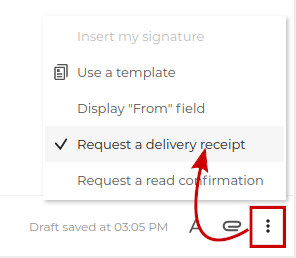
Option activation is visible in the composer status bar:

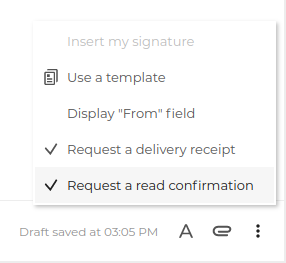
Both types of receipts can be combined:
Delivery receipts and read confirmation requests received in this way are presented by BlueMind with an insert clearly indicating the status of the email, followed by the delivery receipt message itself:
| Acknowledgement of receipt | Reading confirmation |
|---|---|
 |  |
Note that :
- attachments correspond to the standard header files for this type of message
- the acknowledgement message is sent by the interlocutor's server, so its presentation and content may vary from one recipient to another
In the box, click on the subject to open the original message:

Setting up a systematic request
To activate a systematic request for delivery receipt or read confirmation on all outgoing emails, go to Preferences management: Preferences > Mail > General > Delivery receipts and read confirmations and activate the desired request type(s):

Activation and deactivation are instantaneous and automatic, with no need to save preferences.
To learn more about responding to receipt requests in BlueMind, see the page Sending read confirmations.